
Docs navigation
Get started
AI agents
Connect
Operate
Day to day
When it breaks
Govern access
Team & account
Access
Identity concepts
Provider guides
Account
Audit & SIEM
Every important change in your account is recorded: run outcomes and denials, approval decisions, policy edits, credential and team changes, and sign-ins. This page shows how to read the trail in the console and how to stream it into your SIEM.
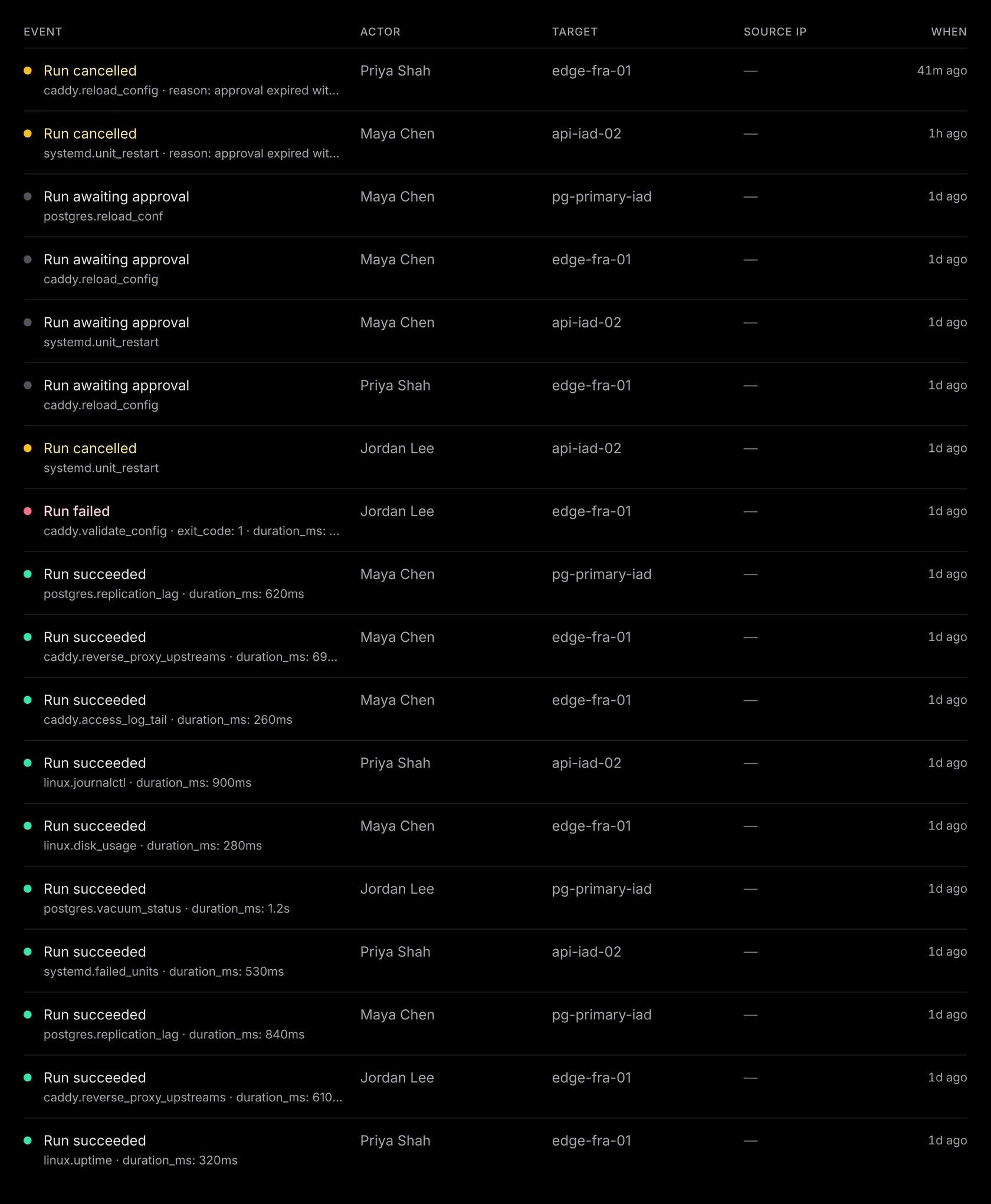
What gets recorded#
Every event has a
domain.action
name, such as action_run.denied, approval.approved, policy.updated, membership.role_changed, or user.sessions_revoked.
More than sixty types cover runs, approvals, policies, packs, runners,
credentials, team changes, and account changes. An event records who acted, what was
affected, when, and a structured payload with the details. A policy edit, for example,
carries its exact diff. The event is written together with the change it records.
For a run, audit records the decisions and the outcome: the denial, the approval gate, the terminal result. Each event links to the run. Action arguments stay in run history, which keeps the exact values and masks declared sensitive fields only in console and API views. The in-between states (pending, sent, running) are on the run's own page, not in the audit trail.
Reading it in the console#
Audit
filters by event type or actor kind, and the Export CSV
button downloads exactly the view you filtered to. Open a row for the full
event details and payload. References show current or recorded names when available;
identifiers remain in the details and exports. A run dispatched by an LLM records the client, the
key, the session, and the required reason,
so one filter answers what the agent did last night and why.
A download covers at most 100,000 events. Past that, narrow the filters. For a complete prepared export, email support@emisar.dev. Only available on Team & Enterprise.
Runner and pack scope limit what a member can run, not what they can see here: the trail is account-wide for every role with audit access. Billing managers see only billing events.
1. Mint an export token#
Mint a read-only audit-export token from SIEM export with Create export token. It is a separate credential kind from an agent key: it can only read events, and it cannot list runners or run an action. Only available on Team & Enterprise.
2. Pull events with a cursor#
GET /api/audit
serves NDJSON: one event per line, in forward keyset order by occurred_at, then ID.
# first pull — everything since a timestamp
$ curl -s "https://emisar.dev/api/audit?since=2026-06-01T00:00:00Z&limit=500" \
    -H "Authorization: Bearer $AUDIT_KEY"
{"id":"019f8a5f-7759-7a33-a47e-9a7c28e10bd1","request_id":"req_cF-s3B3Z-Iu38MDhBCdqlw","account_id":"019f8a5f-74c7-7b9a-980a-0e00422d2541","actor_kind":"membership","actor_label":null,"actor_id":"019f8a5f-749b-72b9-b70f-04b56ebf9e83","ip_address":null,"event_type":"action_run.pending_approval","occurred_at":"2026-07-22T15:09:00.121466Z","target_id":"019f8a5f-75b2-7a64-a955-152da6a993f3","mcp_client_metadata":null,"user_agent":null,"payload":{"action":"postgres.reload_conf","dispatch_reason":"Reload after validating the new configuration","executed_command_truncated":false,"matched_rules":["production-change"],"policy_decision":"require_approval","policy_id":"019f8a5f-7000-7000-8000-000000000007","policy_reason":"Matched the production change rule","policy_version":7,"run_id":"019f8a5f-7758-7cfc-8790-77c9aa9400fd"},"target_label":"pg-primary-iad","target_kind":"runner"}

# follow-ups — same filters, plus the cursor the previous response returned
$ curl -s "https://emisar.dev/api/audit?limit=500&cursor=$NEXT" \
    -H "Authorization: Bearer $AUDIT_KEY"
-
—
Build rules on the top-level fields.
Those are stable. The keys inside
payloaddepend on the event type and can change with the feature that writes them. An empty value is omitted rather than sent as null. Treat the sample above as the envelope, not a schema. Anything worth correlating on, such asmcp_client_metadata, is promoted to the top level for exactly that reason. -
—
Send
sinceon the first call only. You get events at or after that time, and leaving it out reads from the start of your retained history. After that, always send the newestcursor: it wins oversinceand resumes right after the event it names, so a poll cannot rewind by accident. -
—
Every page with events includes
X-Next-Cursor. Save it; that is your resume point. ALinkheader withrel="next"appears only on a full page and means more may be waiting: keep following it until it disappears, then drop back to your normal interval. - — If the response is empty, there is nothing new to stream. Continue with the cursor you already had and poll again later.
-
—
Keep the filters identical for the life of a cursor.
A cursor is only a position in the ordering, and the filters come from the query you
send with each call. A cursor never expires. Change
event_typemid-chain and the same cursor returns different events; run a second chain with its own cursor instead. -
—
limitdefaults to 100 events and is capped at 1,000. The endpoint allows 60 requests a minute per token and answers429past that, so poll on an interval, not in a tight loop.
3. Run a poller that keeps its place#
The loop can run in your SIEM's HTTP input, a log agent, or the script below, which shows the complete contract without vendor configuration. Its only saved state is the cursor.
#!/bin/sh
set -eu

API="https://emisar.dev/api/audit"
STATE="${EMISAR_AUDIT_CURSOR:-./emisar-audit.cursor}"  # the cursor, and nothing else
FILTERS="limit=500"                    # identical for the life of this cursor
BOOTSTRAP="2026-07-01T00:00:00Z"       # used only when there is no cursor yet
INTERVAL=60
SINK="${EMISAR_AUDIT_SINK:-/usr/local/bin/send-emisar-audit}"

work=$(mktemp -d)
trap 'rm -rf "$work"' 0 HUP INT TERM

cursor=$(cat "$STATE" 2>/dev/null || true)

while :; do
  # `since` bootstraps; every later call resumes from the saved cursor.
  if [ -n "$cursor" ]; then query="$FILTERS&cursor=$cursor"
  else query="$FILTERS&since=$BOOTSTRAP"; fi

  # -f so a 401/403/429/5xx is a failure, never an empty page. The cursor
  # does not move on failure, so the next attempt re-reads the same page.
  if ! curl -fsS -D "$work/headers" -o "$work/page.ndjson" \
       -H "Authorization: Bearer $EMISAR_AUDIT_TOKEN" "$API?$query"; then
    sleep "$INTERVAL"; continue
  fi

  # awk exits successfully when the header is absent, which is a normal empty page.
  next=$(awk 'tolower($1) == "x-next-cursor:" {gsub("\r", "", $2); print $2; exit}' "$work/headers")
  # No X-Next-Cursor means an empty page: caught up, keep the cursor.
  if [ -z "$next" ]; then sleep "$INTERVAL"; continue; fi

  # Hand off first, persist second. The sink consumes one page synchronously
  # and exits nonzero on rejection; that leaves the cursor unchanged for retry.
  if ! "$SINK" < "$work/page.ndjson"; then
    sleep "$INTERVAL"; continue
  fi
  cursor="$next"
  printf '%s' "$cursor" > "$STATE.tmp"
  mv "$STATE.tmp" "$STATE"

  # Link: rel="next" rides only a full page — keep paging while it does.
  grep -qi '^link:.*rel="next"' "$work/headers" || sleep "$INTERVAL"
done
The token lives in the environment and the cursor lives in $STATE,
so rotating the credential does not move your place in the stream. Mint the
replacement, restart the poller with the new value, watch one poll succeed, then
revoke the old token. The rotation steps are in rotate and revoke credentials.
4. Watch the poller itself#
A stopped collector and an idle account look the same from your SIEM: no new
events. So alert on the poller itself as well as on what it delivers. Watch the age of
the newest
occurred_at
event, the time since the cursor moved, and consecutive failed polls. The console
reads the same events without a cursor, so rows you can see there that never reached
your SIEM mean the collector is behind, not emisar.
Exports are recorded as
audit.exported
after the page is read, so an unfiltered collector sees its own earlier exports on a
later poll. A page containing only SIEM export receipts does not create another
receipt, so collectors can catch up on an idle account. Those receipts are still
delivered; mixed pages record the full row count, and CSV downloads keep their
own receipts.
Never treat
audit.exported
as operator activity: it shows the exporter ran, and only that. Exclude it from
activity dashboards and keep it for credential monitoring, where an export from an
unexpected address or time is the real signal.
Follow
Link
while pages are full, then wait out your interval. An empty page is a valid
caught-up answer: keep your last cursor and poll again later.
5. Alert on what matters#
Most of the trail is evidence you read after the fact. These are the kinds of event worth waking someone for, because each one either changes what is allowed or shows that a control was tested:
-
—
The rules changed.
policy.updatedcarries its exact diff, and pack-trust changes mean new executable bytes were approved. Both widen what an agent can do, and both are rare enough to review every time. -
—
Authority moved.
Credentials minted or revoked, role changes, runner enrollment and deletion, and
identity events. An unexpected
user.mfa_reset_by_adminis the classic example. -
—
Something was refused.
action_run.deniedwith its reason, and on the runner sidevalidation_failed/action_blocked_by_admission. A single denial is noise. A repeated pattern from one actor is an agent probing for what it cannot have, and that is the most useful signal in the trail. - — A decision waited too long. Approval requests that sit unanswered are an operational signal rather than a security one. They are why a run looks like it did nothing. Approval expiry is in policies & approvals.
Retention#
Retention follows your plan: 7 days on Free, 90 on Team, 365 on Enterprise. Each event keeps the window it was written with, so a downgrade affects only new events and does not delete history you already have. The plan change and every retention prune are recorded too. Your SIEM keeps events as long as you decide, so fix a stalled poller before the oldest unexported event expires.
The runner-side journal#
Each runner normally keeps its own journal: two JSONL lines per action attempt
(start and result) in /var/log/emisar/events.jsonl,
each line chained to the previous one by SHA-256.
emisar audit verify --all
checks the whole chain, rotated files included, and flags a break.
Verification covers only the journal lines still on disk; it cannot rule out that a privileged host operator replaced or truncated the entire local journal. The cloud trail is the independent copy, out of the host's reach.
Send both records to your SIEM and match attempts by run ID and UTC time. A mismatch is an investigation signal, not a verdict. First account for the collector poll interval and a host crash before its local write, then treat what remains as possible loss or tampering.
Troubleshooting#
The audit export#
- — It stopped advancing. An empty page means caught up, not stuck. The collector keeps its last cursor and polls again later.
- — Events repeat, or look missing. A collector that restarts from a timestamp rereads events, and a crash between handing off a page and saving its cursor repeats the page. It cannot skip unprocessed events. Process pages idempotently (so a repeat is harmless) and expect duplicates instead of assuming exactly-once delivery.
-
—
It gets 429, 401, or 403.
A
429means the poller is over the rate limit. Poll on an interval, not in a loop. A401means the bearer is unknown or revoked. A403means authentication succeeded, but this token lacks access. The usual causes are an agent key used where an audit-export token belongs (one never works in place of the other), a plan without export, or a role without audit access. The poller must keep its cursor and retry, because a failed request is not an empty page. - — Contact support when a page returns events you can see in the console with a cursor that does not advance past them.