
Docs navigation
Get started
AI agents
Connect
Operate
Day to day
When it breaks
Govern access
Team & account
Access
Identity concepts
Provider guides
Account
Runs & history
Use the Runs page to see what your fleet did. It lists every action dispatched to a host, with its requester, result, and policy decision.
The Runs list#
Each row is one action call on one host: the time, action ID, target runner, dispatcher, status, and duration. Rows update live as a run moves through its lifecycle, so you can watch a dispatch go from queued to finished without reloading. On a phone, the first line carries the action and status, and the second the origin, runner, and time.
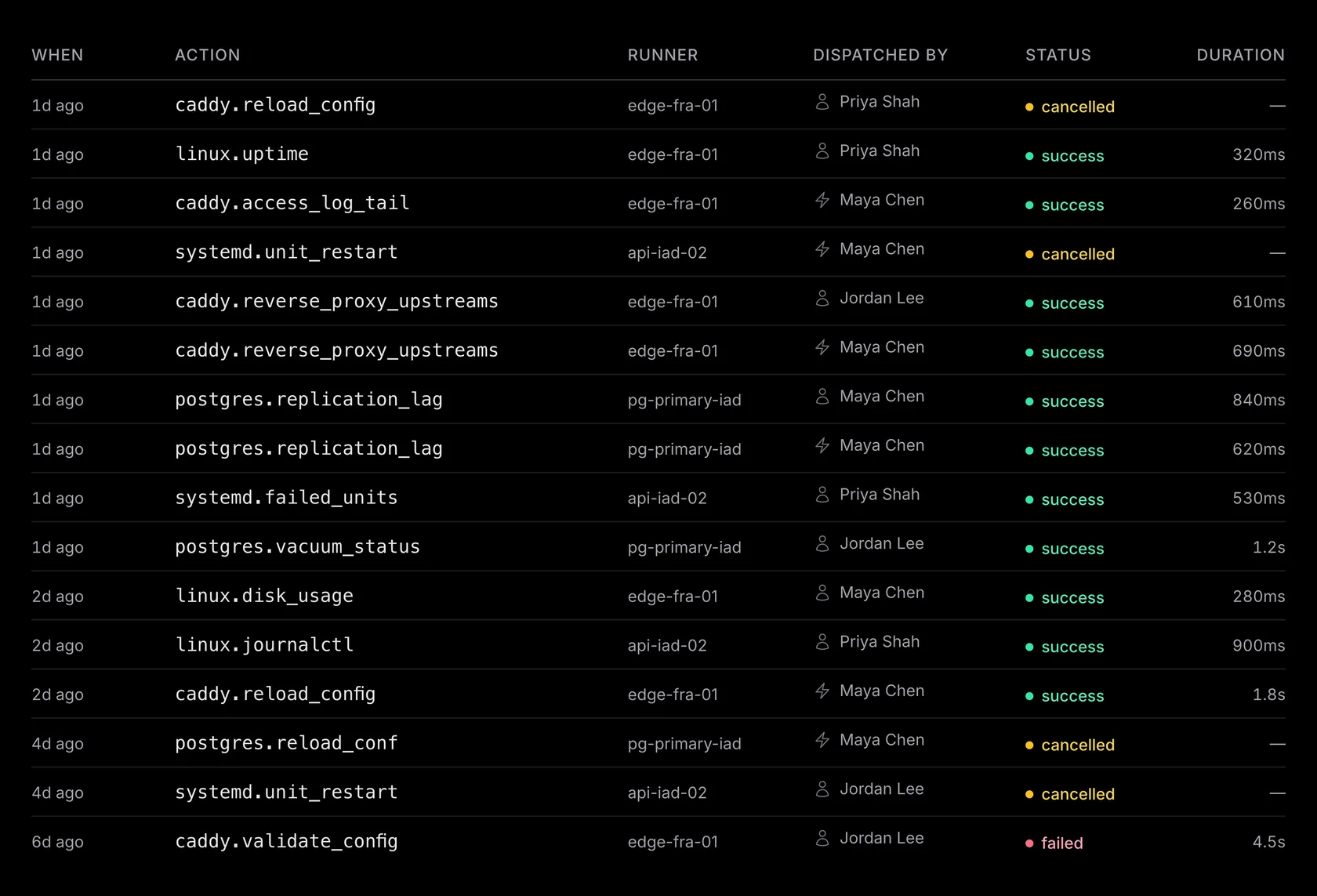
Four filters narrow the feed. Each one is kept in the URL, so the back button, a refresh, and a shared link all land on the same view:
- — Status. One or more lifecycle states. You can show just the failures, just what is awaiting approval, or just what is still in flight.
-
—
Action.
A case-insensitive substring match on the action id. Typing
postgresfindspostgres.vacuum_tableandpostgres.uptime. - — Runner. A searchable list of your runners, to scope the feed to one host.
- — Dispatched by. The origin: Operator, AI agent, or Runbook. Select an origin to show a second filter. Use that filter to choose a team member, agent, or runbook.
A runner's page links straight to its own runs. An agent's page links to the runs dispatched with its key. To see what a host or an agent did, you follow one link instead of building the query by hand.
Run statuses#
A run moves through a small state machine. It starts pending, becomes sent, then running. From there it settles on exactly one terminal outcome. Policy can settle a run before it ever reaches a host. A require-approval decision parks it at awaiting approval, and a deny decision ends it at denied.
| Status | What it means |
|---|---|
| pending | Queued for the runner. If the runner is offline, the run waits for it to reconnect. |
| awaiting approval | Waiting for manual approval required by policy. If approval is denied or expires, the run is cancelled. |
| sent | Sent to the runner; waiting for it to acknowledge the action. |
| running | The runner is executing the action. Output appears as it arrives. |
| cancelling | Cancellation was requested. Waiting for the runner to confirm whether the action stopped. |
| success | The runner reported success. Any required structured output passed validation. |
| failed | The action ran and exited non-zero. |
| error | The run couldn't complete or its final result wasn't received. Check the recorded error. |
| timed out | The action ran past its time limit and the runner stopped it. |
| validation failed | The action's structured output didn't match its required format. |
| unknown action | The runner doesn't have this action installed. |
| refused | The runner rejected the action during its trust or security checks. The action didn't run. |
| denied | Policy blocked the action before it reached the runner. Check the matching rule and reason. |
| cancelled | The run was cancelled before it started or stopped by the runner. Check the recorded reason. |
Three terminal statuses look similar but call for different responses: denied needs a policy change, refused usually needs pack trust or signing repair, and failed is a real action result, not a gate.
A single run#
Open a row from Runs to see one invocation. The fact strip starts with the outcome. It shows Status, Runner, Dispatched by, Duration, Exit code, and Created. The Runner value links to that host. Created is when the run was requested, before any queue or approval wait. Use View audit trail for its audit records.
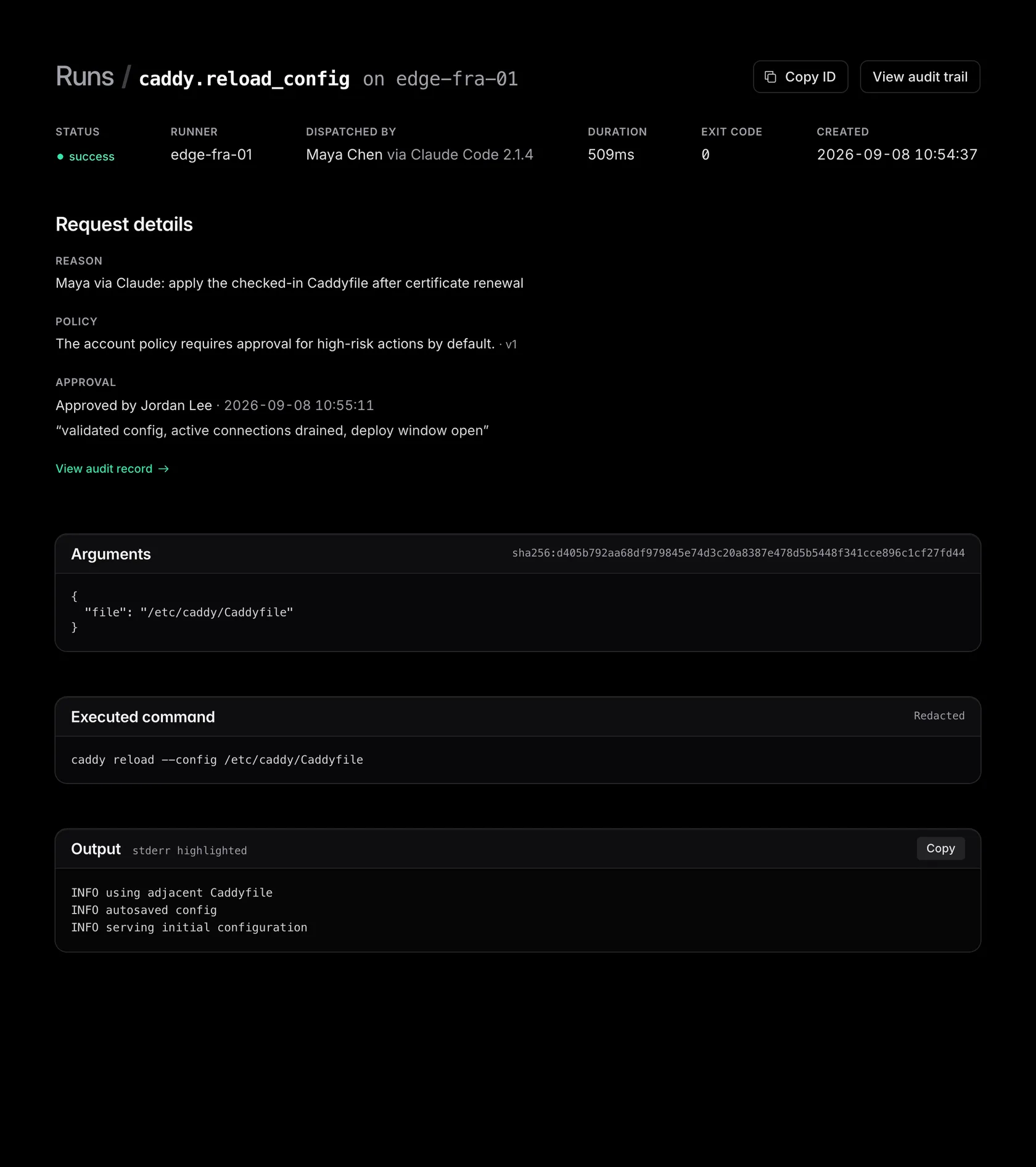
Dispatched by
shows the accountable person first. An operator run shows the team member who ran
it. An agent run shows the human who owns the agent key, with the client as
secondary context: jordan@example.com via Claude Code. A runbook run shows the runbook. The audit trail uses the same human-first
attribution, so the row itself shows who ran the action and through what.
Request details
shows why the action was requested. Every dispatch includes a
reason
from the operator or agent. An agent can also include evidence and expected outcome:
evidence records what it observed, and expected records the outcome that confirms
success. When
policy intervenes, the run shows the matching rules and exact policy version. The run does not show a routine
allow, because every dispatched run already passed policy.
Below that, Arguments
shows the values passed to the action, with a
sha256
fingerprint of the exact bytes. The control plane stores the exact arguments and uses
them for authorization, approval, dispatch, and hashing. UI and API views mask fields
the action marks as sensitive, and secrets in unmarked fields remain in the stored
arguments.
Executed command shows the shell line the runner ran. The runner applies configured redaction to the command and output before they leave the host. Redaction is best-effort, not a guarantee. The security model explains how the redaction pipeline works.
Live output and caps#
The output panel streams stdout and stderr line by line as the runner produces them. The stderr stream is highlighted separately. A Streaming marker appears while the run is active. A run with no output says so instead of showing an empty terminal. When the action returns structured output, switch between Text and JSON. Copy copies the selected view.
The terminal shows the most recent 500 chunks of text output. Earlier output is hidden while the run is active. After it finishes, use Load earlier output to read more. This display limit does not remove stored output.
Truncation can also happen at the source. The runner limits the output it captures according to the action's output settings. When it hits that limit it clips the stream and flags the run as truncated. Each run also records whether every progress chunk arrived, so a gap left by a mid-run disconnect is visible.
Every run has a durable output budget that holds across runner reconnects. A run that reaches it visibly stops accepting further chunks. The numbers are in Limits.
Cancelling a run#
You can stop a run that has not finished. Open it from Runs and use Cancel run. It is available to operators, admins, and owners while the run is queued, waiting for approval, sent, or running. What happens depends on where the run is:
- — Queued (pending). The run has not reached the runner yet. It is cancelled immediately and never dispatches.
- — Waiting for approval. Cancelling the run also closes its approval request. The action will not run.
- — In flight (sent or running). emisar asks the runner to stop the action. The runner sends SIGTERM to the action's process group, then SIGKILL if needed. The run remains at cancelling until the runner reports its final outcome. Changes already made are not undone.
Cancellation is recorded in the audit trail. Repeating the request does not change a run that has already finished.
An agent can cancel its own run through the MCP
cancel_run
tool while the run is queued or waiting for approval, for example when the work is no
longer needed. Once the run reaches a runner, only the console can stop it.
Operations and retries#
emisar never retries a finished run. Running the action again (from a runner page, a runbook, or an agent) is a new run with its own record. If the runner disconnects mid-run, the action keeps running and its result arrives on the next connection. If it disconnects before dispatch, the run waits in the queue until the runner returns. The runner fleet guide covers reconnects and stuck runs.
When an agent sends one action to a runner group, each host gets its own run. emisar groups them under one operation of up to 16 runners, with one result per host. Replaying the operation returns the original runs. A lost response never causes a second execution.
A runbook execution is grouped the same way: every run its steps produced, in dispatch order. To recover an operation after a lost response, the MCP CLI & reference has the contract.
Troubleshooting#
Read the status first. Run statuses above lists them all, and three are easy to confuse:
| Status | What it means | What to do |
|---|---|---|
| failed | The action ran and exited non-zero. | Read the output to find why the command failed. |
| error | The run couldn't complete or its final result wasn't received. Check the recorded error. | Read the error and check the host before running the action again; it may already have made changes. |
| timed out | The action ran past its time limit and the runner stopped it. | Check the host for partial changes before running the action again. |
- — A queued run is usually not stuck. It waits for its runner and is delivered as soon as that runner reconnects. If the host is still gone after a short grace window, emisar ends it as error rather than leave it queued indefinitely.
-
—
A run that ends with
execution_outcome_unknowncan have completed its work. The runner reports this when its process or host dies after execution starts, before the terminal result was saved. emisar never runs that dispatch again automatically. Check the target system before you retry. -
—
Output stopped but the run is still running.
The runner limits output per action and reports truncation, so a quiet run is more often a
quiet command than a lost stream. Check the host with
sudo emisar events tail -f, which shows the local journal live. -
—
On Team or Enterprise, contact support
when the same dispatch reports
execution_outcome_unknownrepeatedly, or a run stays running with no progress while its runner is connected and idle.