
Docs navigation
Get started
AI agents
Connect
Operate
Day to day
When it breaks
Govern access
Team & account
Access
Identity concepts
Provider guides
Account
Directory sync (SCIM)
Directory sync uses SCIM 2.0 to let your identity provider manage members in emisar. It provisions people, and when they leave it suspends their workspace membership, ends their browser access to that workspace, and revokes keys issued from that membership.
Directory sync builds on a configured SSO connection. If you have not connected your identity provider, start with Single sign-on. Then enable directory sync on that connection.
Enabling directory sync#
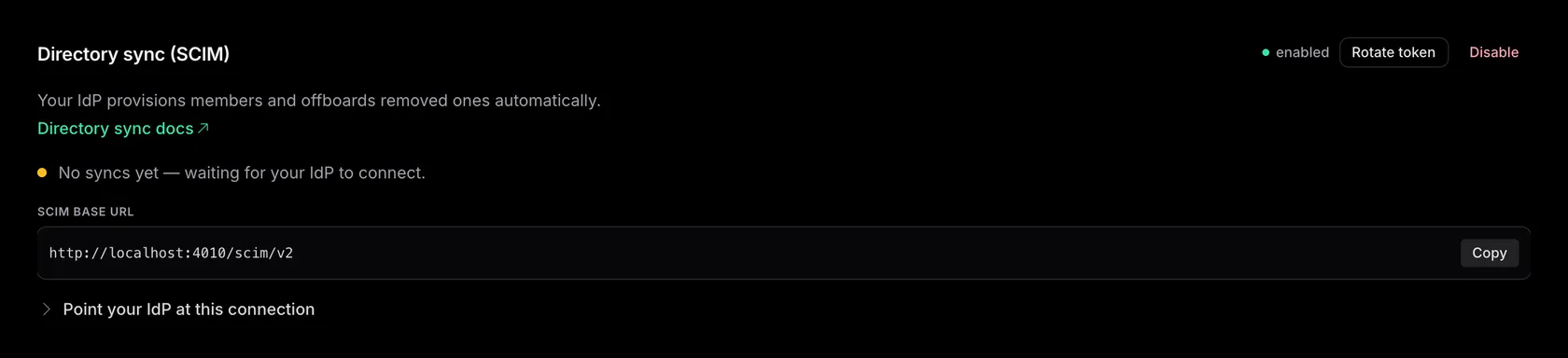
Open the configured connection from Team → Single sign-on and enable directory sync. The panel is on the connection's page, under its settings. Only available on Enterprise.
-
1
From Team → Single sign-on, open the connection and click Enable under User provisioning & directory sync.
emisar shows you two things to wire into your provider's SCIM connector:
-
—
the SCIM base URL:
/scim/v2on your emisar host (copy button beside it) - — the bearer token, shown once when you enable or rotate, so copy it immediately. If you missed it, Rotate token mints a new one and the old one stops working.
-
—
the SCIM base URL:
-
2
Point your IdP's SCIM connector at that base URL and bearer.
Set the SCIM endpoint to the base URL, paste the token as the API token (emisar reads it from the
Authorizationheader), and enable Create, Update, and Deactivate. Okta and Entra need a separate provisioning application, because their OIDC login applications cannot provision through SCIM. JumpCloud handles sign-in and provisioning in one application. The Setup instructions guide lists the provider-specific settings. -
3
Match the SCIM externalId to the OIDC subject.
Configure
externalIdto carry the same stable value as the connection's identifier claim, so the SSO login and the synced record resolve to one emisar identity. Matching never uses email, so emisar cannot match identifiers that differ.-
—
Okta
usually needs no changes: it puts the Okta user ID in
externalId, and its organization authorization server sends the same value assub. Okta shows that in examples but does not guarantee it, and a custom authorization server can rewrite the subject claim. -
—
Entra
needs changes on both sides: map
externalIdfrommailNicknametoobjectId, and set the connection's identifier claim tooid. Entra sends a differentsubper application, so without both changes the login and provisioning applications identify different people.
Whatever the provider, check both values against one real user before you roll out.
-
—
Okta
usually needs no changes: it puts the Okta user ID in
- — Provisioning creates a workspace member at the connection's default role before their first sign-in, with runner access combined from Default access and mapped directory groups. The member then signs in through the connection, as described under single sign-on.
-
—
When the directory deactivates or removes a user, deprovisioning suspends the member. Their
existing browser access to this workspace ends and keys issued from that
membership are revoked immediately. The same person's memberships in other workspaces are not
affected. The person and audit history remain.
The directory can reverse a deactivation with
active:true; after DELETE, it must POST the sameexternalIdto restore the resource. emisar refuses to deprovision the last active owner and returns an error to the directory. Promote another owner first. - — An offboarding reaches emisar when your provider sends it, and Entra sends changes about every 40 minutes. For an urgent one, also choose Suspend access on the Team page. Directory sync never lifts that hold.
- — Unassigning the wrong group in your provider suspends everyone in it, and restoring them does not bring back their agent keys or standing approvals. Turn on your provider's safeguard where it has one: in Entra, Prevent accidental deletions holds a large batch of deactivations until an admin allows it.
Rotate or disable directory sync#
Rotate token mints a new bearer and the old one stops working immediately. Paste the new value into your IdP connector. Disable also stops the bearer, but members are kept: the directory just stops managing their role and runner access, and owners and admins control those again. If you re-enable sync later, group-based access returns only after the directory pushes its groups again.
Because there is no overlap, the connector is unauthenticated between the rotate and the paste, so plan for that gap. For the rotation sequence, and how a SCIM bearer compares with every other credential emisar issues, see rotate and revoke credentials. If you believe the bearer has leaked, see security incidents.
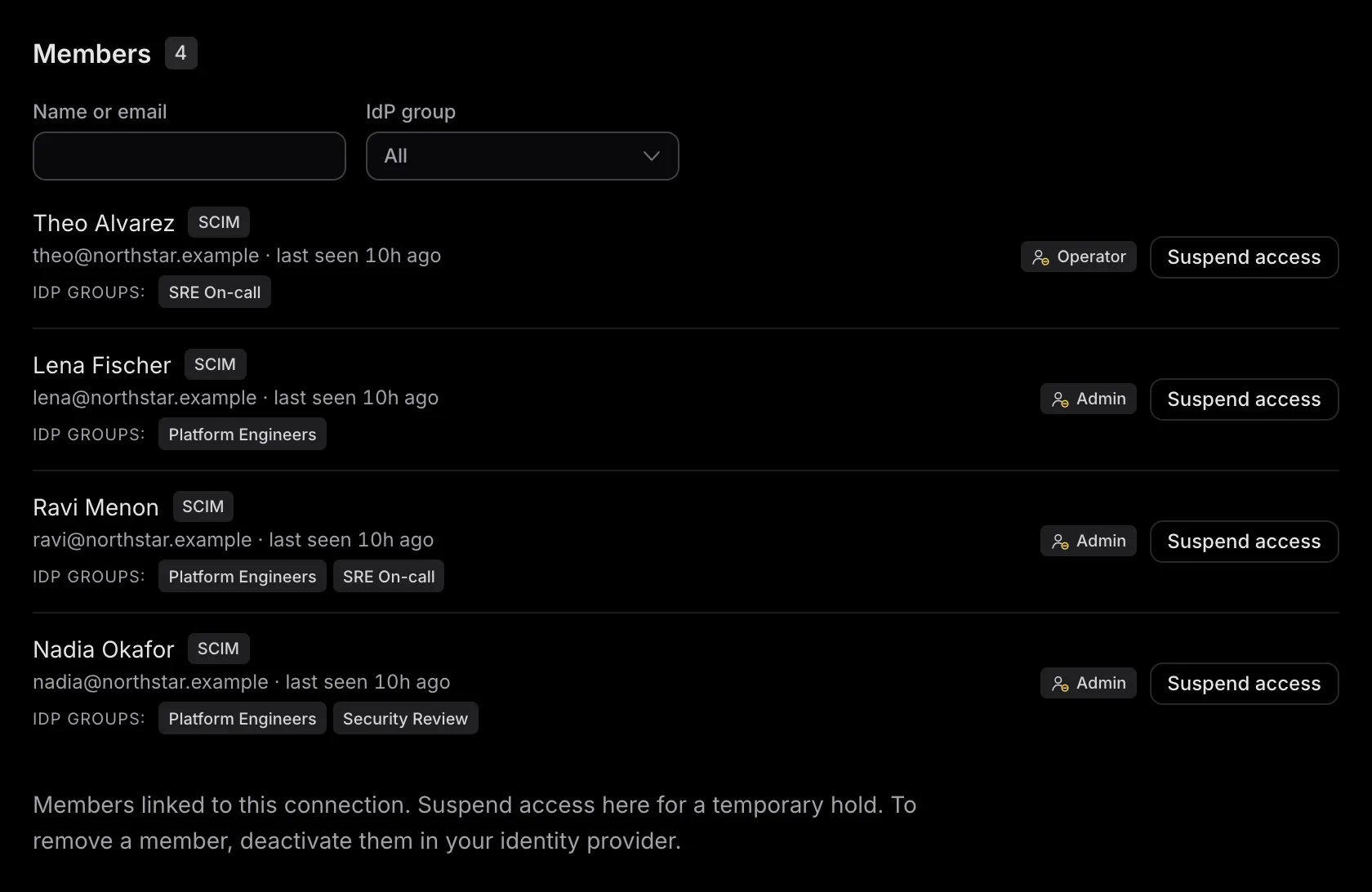
The connection's Members list includes identities added through sign-in and directory sync. Last seen records the identity's latest activity, including sign-in; it is not a directory-sync success receipt. Suspending access in emisar creates a manual hold that later directory sync does not remove. Restore access does not restore revoked agent credentials or standing approvals. Directory-deactivated members must first be reactivated in the identity provider.
SCIM protocol reference#
Every endpoint is under the connection's /scim/v2 base URL and requires its
bearer token. The token selects the account and provider. Resources cannot be read or
changed across connections.
| Resource | Supported operations |
|---|---|
|
/ServiceProviderConfig /ResourceTypes /Schemas |
Authenticated GET discovery, including individual ResourceType and
Schema resources for User and Group.
|
| /Users |
Collections support GET
and POST. Resources support GET, PUT, PATCH, and DELETE.
Resource paths use the immutable id
returned by emisar.
|
| /Groups |
Collections support GET
and POST. Resources support GET, PUT, PATCH, and DELETE.
Resource paths use the returned id. Group writes reconcile the pushed
membership before mappings are applied.
|
Users#
-
—
POSTrequiresexternalIdoruserName.activedefaults to true. emisar accepts a JSON boolean or the case-insensitive strings"True"/"False"that Entra sends. Repeating a create with the sameexternalIdreconciles the existing identity and returns the same serverid. -
—
A
POSTfor a newexternalIdanswers409when a member of this workspace already uses that email, and waits for approval under Team → Pending access requests. Once it is approved, the directory's next retry reconciles that member. Re-adding a removed person whose address another member or a pending invitation now holds is refused with409(uniqueness) until that address is free. -
—
Collection filters support
userName eq "..."andexternalId eq "...". Unsupported filters returninvalidFilter. Names, contact addresses anduserNamefilters use this workspace's member profile. Collections use one-basedstartIndex/countpagination, return at most 100 resources per page, and report the full matching count intotalResults. -
—
PATCHacceptsaddorreplaceforactive,displayName,name.formatted,name.givenName,name.familyName,emails,emails[type eq "work"].value, andemails[primary eq true].value, including the pathless attribute map Entra sends.PUTrequiresactivein one of those boolean forms and can update the name and the primary email.externalIdstays fixed after provisioning. Name and email updates change only this workspace's member. The directory changes only an email it supplied; one the member confirmed by invitation or sign-up stays theirs. A new email is never a sign-in address: directory members sign in through SSO. An email another member or an open invitation uses answers409(uniqueness) and applies nothing; an update that suspends the member leaves its email as it was. -
—
PATCH active:falsesuspends the membership while keeping the User resource addressable, andactive:truelifts that suspension.DELETEalso retires the User resource: later reads and mutations return 404 until the directory POSTs the sameexternalId. The directory does not reverse a manual administrator suspension.
Groups#
-
—
POSTandPUTreconcile the full membership.PATCHsupports memberadd,remove, and whole-setreplace, plusdisplayNamereplacement. Eachmembers[].valueis the returnedidof a User resource. -
—
A Group
POSTwithexternalIdreconciles that directory resource. A probe withoutexternalIdgets a new serverid. Use that id for later reads and writes.displayNameis a label and filter, never the group's identity. -
—
Collection filtering supports
displayName eq "..."and uses the samestartIndex/countpagination as Users. Deleting a group removes everyone from it, recomputes their mapped authorization, then retires the SCIM group resource. - — One request accepts at most 100 PATCH operations. A group write accepts at most 5,000 member IDs. Bulk, sorting, ETags, and password changes are not supported.
Provider guides#
The IdP-side walkthrough lives on each provider's guide, beside its sign-in setup:
- Okta runs SCIM through its own Okta app, separate from the sign-in integration.
-
Microsoft Entra
uses a separate enterprise application, with
externalIdremapped toobjectId. - JumpCloud uses the same custom application that signs people in.
- Keycloak has no outbound SCIM. The guide explains the remaining manual work.
- Google Workspace has no outbound SCIM. Route it through an IdP to close the offboarding gap.
Role mapping#
In Groups & access, use a group's role dropdown to assign an emisar role: viewer, operator, billing manager, or admin. A member in several mapped groups gets the highest role mapped to any of them. If none of their groups has a role mapping, the connection's default role applies. That default is a fallback, not a minimum. Renaming a group does not break its mapping. Owner is never assignable through sync. It stays a deliberate human assignment.
A mapping covers only the members your provider sends for that group. Entra sends the direct members of an assigned group, never the members of a group nested inside it. So assign and map the groups that contain the people directly.
Directory sync cannot grant or remove Owner privileges or narrow an Owner's runner and pack access. It can still suspend an Owner, subject to the last-owner safeguard. To hand an Owner's role and access back to the directory, another Owner chooses Use directory role from their role menu on Team. While sync is pending, that member has Viewer privileges and no runner or pack access.
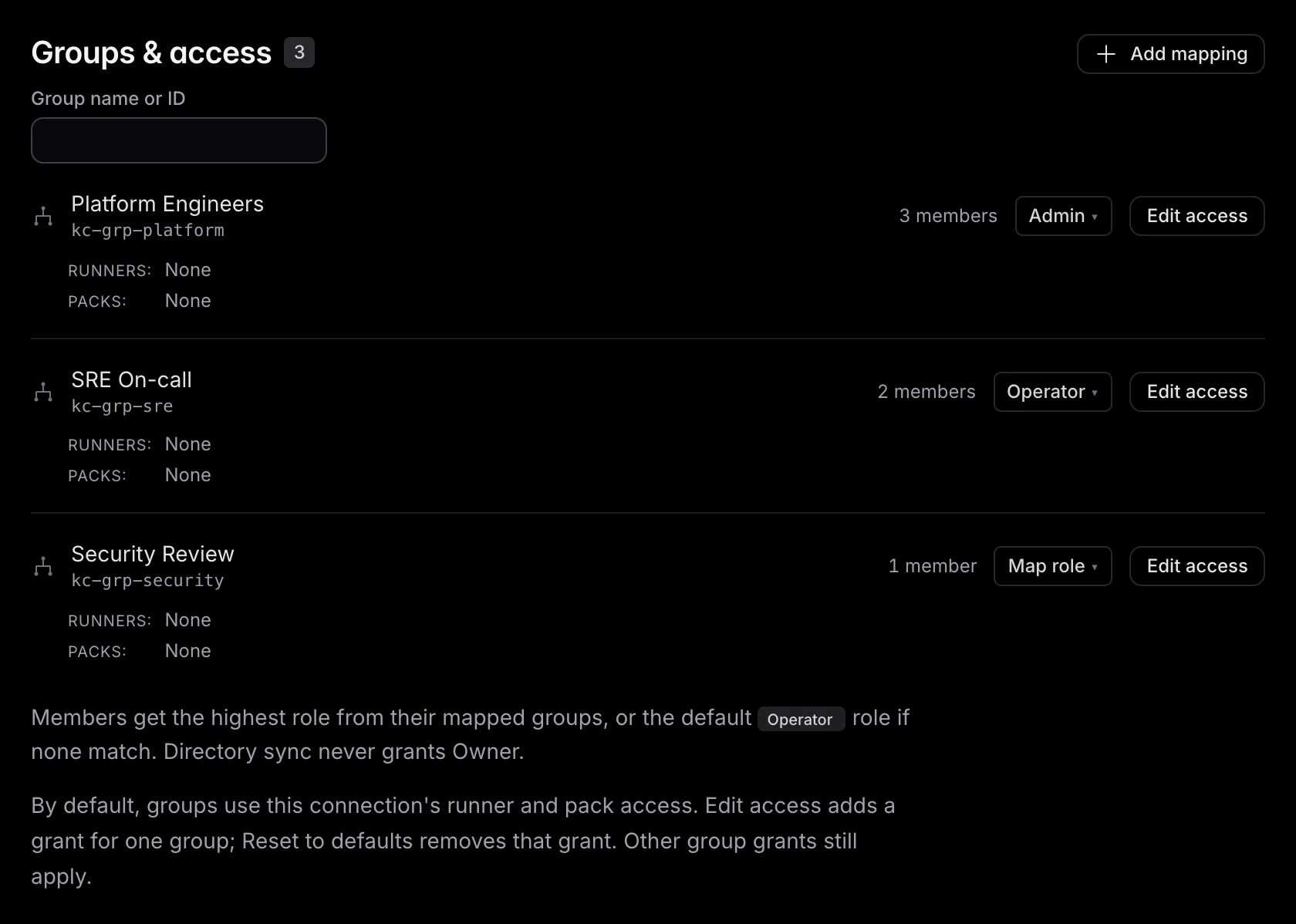
Mapping directory groups to runner access#
In Groups & access, each row shows the connection defaults plus that group's runner and pack grants. Choose Edit access on the group to add access to all runners, selected runner groups, or individual runners and packs. Connection defaults stay selected and locked in the editor; you can keep that access or add more. Choose Reset to defaults in the editor to remove only that group's access grant; its role mapping stays unchanged. The grant applies to current group members immediately and follows later SCIM membership changes.
Group runner access is additive: emisar
combines Default access with every mapped group the member belongs to. A
mapping cannot remove access granted elsewhere, and any All runners grant wins. For example, a no-runners default plus
database-team → group:database-prod
gives those members exactly the database runner group. If another mapped group
grants all runners, members in both get all runners.
emisar does not treat "no groups received yet" as "this member belongs to no groups." Until the directory sends its first group snapshot, members keep the authorization they already had. After that snapshot, removing the last mapped group returns the role to the connection default and removes that group's runner grant.
Troubleshooting#
Use these checks for directory-side symptoms. If you are not sure the problem is provisioning, start from Troubleshooting. It routes each symptom to the page that owns it.
| Symptom | Check |
|---|---|
| The IdP cannot verify credentials |
Use the connection's exact SCIM base URL and send the token as Authorization: Bearer …. If you rotated the token or disabled
sync, the old value is invalid immediately.
|
| The connection says Waiting for first request | The bearer has not authenticated successfully yet. Run the IdP connector's test, then check that provisioning is enabled and assigned. After the first request, emisar shows Last request with its age. This records an authenticated request, not a successful synchronization. |
| Someone is not added, updated, or suspended | Look under Refused changes on the connection's page. It lists each change emisar refused in the last 7 days, with the reason and the fix. Your provider retries a refused change until it succeeds; emisar records it once a day as Directory change refused in the audit log. |
| SSO login and SCIM provisioning create different identities |
Compare one user's SCIM externalId
with the OIDC identifier claim.
They must be the same stable value. For Entra, map externalId
to objectId
and use oid
for OIDC.
|
| A group mapping has no effect | Confirm the group appears under Groups & access, has the intended role or access grant, and the IdP pushed members. Mappings target the exact synced group resource, not its display name. |
| Offboarding returns a conflict | emisar refuses to suspend or delete the account's last active owner. Promote another owner, then retry the directory operation. |
Security notes#
- — The SCIM bearer token is an admin-grade credential. It can provision and deprovision across the account, so treat it like a password and rotate it from Team → Single sign-on whenever it is exposed. Your IdP loses access until you paste the new token.
- — Each directory-sync action records its authentication method in the audit log . This shows whether the directory, rather than a person, suspended an offboarded member.