
Docs navigation
Get started
AI agents
Connect
Operate
Day to day
When it breaks
Govern access
Team & account
Access
Identity concepts
Provider guides
Account
Policies & approvals
Every run dispatch passes through your account's policy before it's sent to a runner. The policy makes one of three decisions: run it, pause it for approval, or deny it.
How a decision is made#
Each pack action declares its risk tier. Neither the caller nor the control plane can change it. A policy then decides whether the run is dispatched, paused for approval, or denied.
The policy is selected by scope, most specific first: the runner's own ruleset, then its group's, then the account default.
A policy can define per-action overrides. It goes through the ordered list of action ID
patterns. For example,
nomad.job_*
requires approval and
*.delete_*
denies. The first match wins, so put the most specific patterns first.
If no override matches, the action's risk tier defaults
(low / medium / high /
critical) make the decision. In the policy, these decisions are allow, require_approval,
and deny. When the policy cannot answer (a missing
policy, an unknown tier), it denies.
A sensible first policy#
Keep the shipped defaults, then add overrides where real use shows you need them:
- Run a week with the defaults. Watch the Approvals queue. The requests that keep showing up are your override candidates.
-
Deny anything you never want an agent to touch
(
*.purge_*→deny). A written rule beats everyone remembering. -
Turn repeated approvals into expiring standing grants instead of
allowoverrides. A grant stays tied to one key and expires on its own.
An override can also remove a wait for approval. Some reads are high risk because their output can leak secrets. A full config dump, for example, may contain a credential, so the shipped policy holds these reads for a person. If your configs hold no secrets, or the exposure is acceptable, allow the action:
overrides:
  - name: allow-journal-reads
    action: linux.journalctl*
    decision: allow
  - name: allow-nginx-config-dump
    action: nginx.config_dump
    decision: allow
Redaction still masks credential patterns it recognizes, but it can miss some. Treat the output as sensitive when you allow a full dump.
Editing the policy#
Open Policies in the console sidebar. Owners and admins can edit; operators and viewers can read. The editor shows the four tier menus above the ordered override list. A higher tier can never be looser than a lower one. The editor and the API both refuse such a setting.
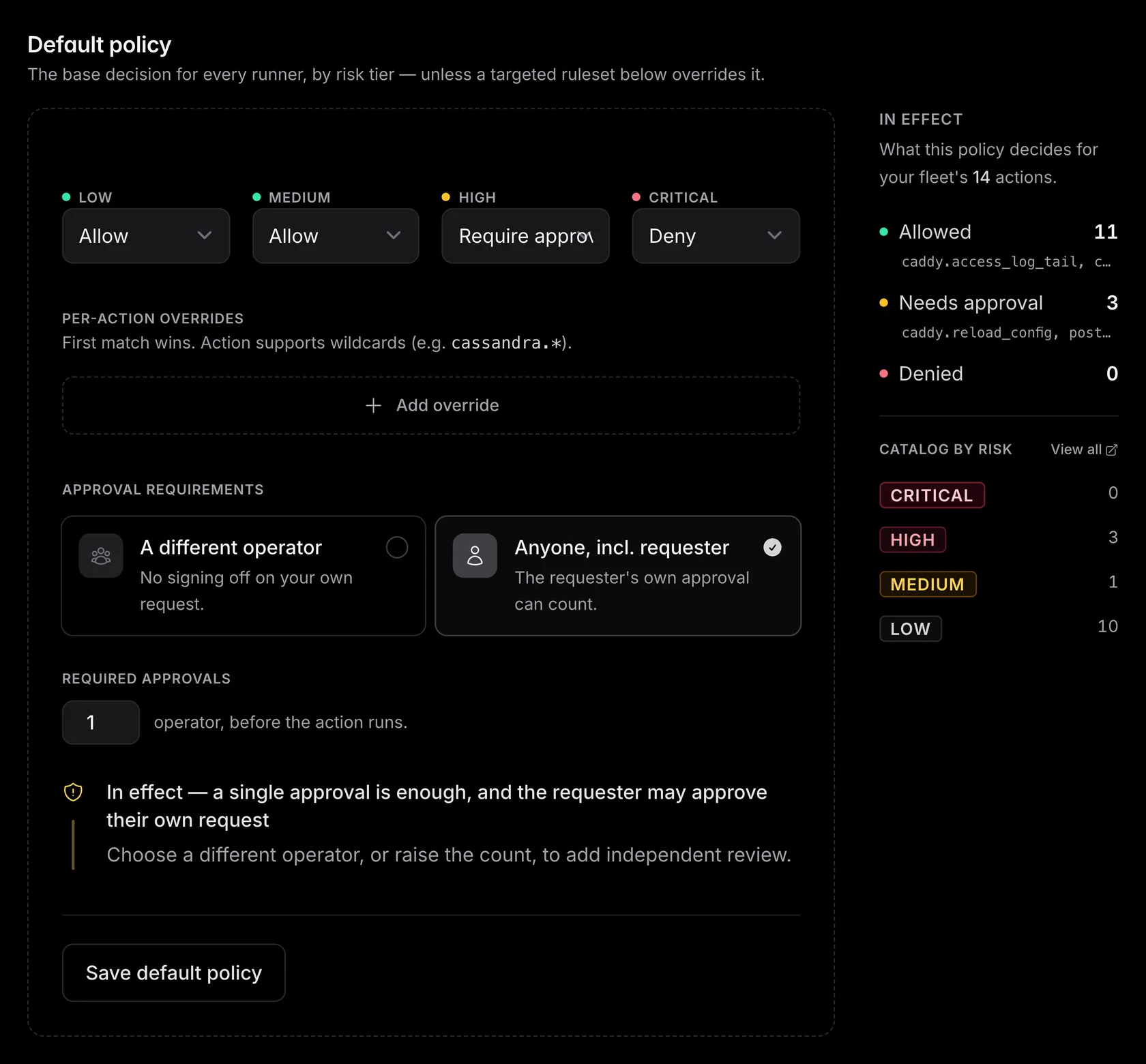
The preview runs your edited rules against the scope's real catalog, so you see each action's decision before saving.
Saving a change raises the policy version and applies from the next dispatch. Every save writes an audit event, and every run records the policy version that gated it, so you can always see which rules were in force.
Scope it to a runner or group#
The default policy governs the fleet. When one runner or group needs different rules, such as a locked-down database host or a permissive staging group, add a targeted ruleset for it in Policies.
A ruleset replaces the default policy for its runner or group, so what you see for a scope is exactly what runs there. Remove it and the scope falls back to the next-broader policy.
Give the staging
group a ruleset that sets every tier to
allow
with no approvals. An agent can reproduce a bug, test a fix, and verify the result
without waiting. The production change it hands you is still held for approval by
your stricter default.
Approvals#
When the decision is require_approval, emisar holds the run and creates an approval request. Owners, admins, and operators get an email
with a direct link, and the request appears under Approvals
in the console with a live badge.
A member your identity provider added, at first SSO sign-in or through SCIM, gets approval emails at the address the provider supplied. emisar trusts the provider for that address and does not send it a confirmation code. The emails show the action, runner, reason, and redacted arguments, so keep members' addresses correct in your directory.
Requests, votes, and grants belong to a person's exact membership in this account. Removing and re-inviting someone does not transfer their earlier approvals to the new membership. Losing approval authority retires pending votes and standing grants. Completed decisions keep their recorded member's local name when available.
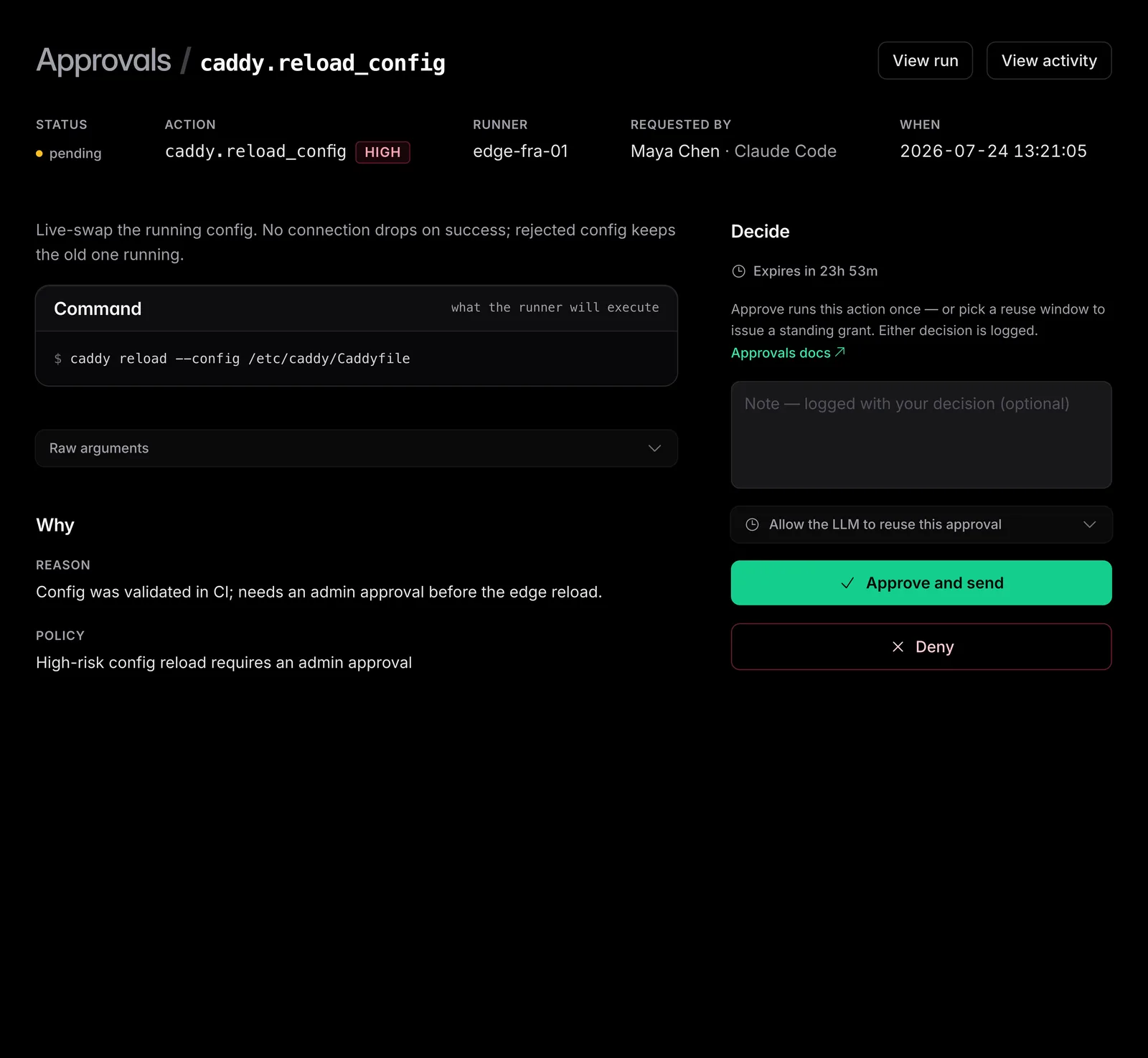
- — One approval releases a run by default. For destructive work, require two approvers with self-approval off, so the requester cannot approve their own request.
- — If an action or pack is unavailable, the decision panel explains the block. After restoring it, choose Recheck. Your note and reuse choices stay in place. Rechecking does not approve the request or switch it to a newer pack version.
- — If the required reviewers are unavailable, an owner or admin can use Approve with override. They must give a reason; it is recorded with the decision. The exception skips the missing reviews and, when necessary, the self-approval rule; it creates no standing grant and gets its own audit record. Scope, expiry, cancellation, pack trust, dispatch signatures, initiator access, and runner admission still apply.
- — Undecided requests expire after 24 hours and the held run is cancelled.
-
—
An LLM waiting on an approval long-polls
wait_for_runand picks the result up the moment a human decides. -
—
An LLM that no longer needs the action cancels its own held run with
cancel_run. The request closes and the approvers are notified. - — Each vote and final decision is audited with its approver, run ID, decision, and reason. Follow the run ID for the requester, action, arguments, and dispatch reason.
Standing grants#
Approving the same
nomad job revert
for each of 20 allocations helps nobody. Approval applies to
This run only
by default. When standing grants are enabled, choose
Allow the agent to reuse this approval
and a duration allowed by your account
so matching future calls skip the queue:
- — Scoped tight. A grant is bound to one API key and action, and optionally one runner. When you approve, choose whether it covers only these exact arguments or any arguments.
- — Capped and revocable. A grant can carry a use limit, always expires, and is listed under Approvals, where you can choose Revoke and confirm to end it early. Every use is still a fully audited run.
The reason requirement#
Every dispatch, from the console or MCP, must include a reason.
Approvers see it, and the run and audit event keep it. For an agent, the reason says
why it ran nomad job revert;
the action name only says what.
An MCP caller can also send
evidence
(earlier findings or run IDs that led to the call) and
expected
(the outcome that confirms success). Together with the reason, they preserve what the
agent saw, why it acted, and what it expected. Operator and runbook dispatches leave
both empty.