
Docs navigation
Get started
AI agents
Connect
Operate
Day to day
When it breaks
Govern access
Team & account
Access
Identity concepts
Provider guides
Account
Runbooks
Build a procedure from declared actions and publish it only when every target resolves. A run executes one frozen plan through policy and approval, and stages stop at the first failure. Each command, output, and decision remains reviewable.
- At least one runner enrolled in the account that the runbook can target — by name, or through a group.
- The required action packs installed and trusted on those runners.
- Permission to manage or run runbooks. If policy requires approval, an approver whose runner scope covers the complete plan.
The shortest path#
- Create a draft in Runbooks, or import a canonical JSON definition.
- Add operator context and run-time inputs, then define each step's action, arguments, outputs, success conditions, and optional wait.
- Select the target scope, then choose an action available across that complete scope.
- Publish after the current definition and live preflight both pass.
- Supply the run-time values and reason, review the resolved plan, and start it.
- Collect the required approvals for the complete execution, then review each result.
1. Create or import a draft#
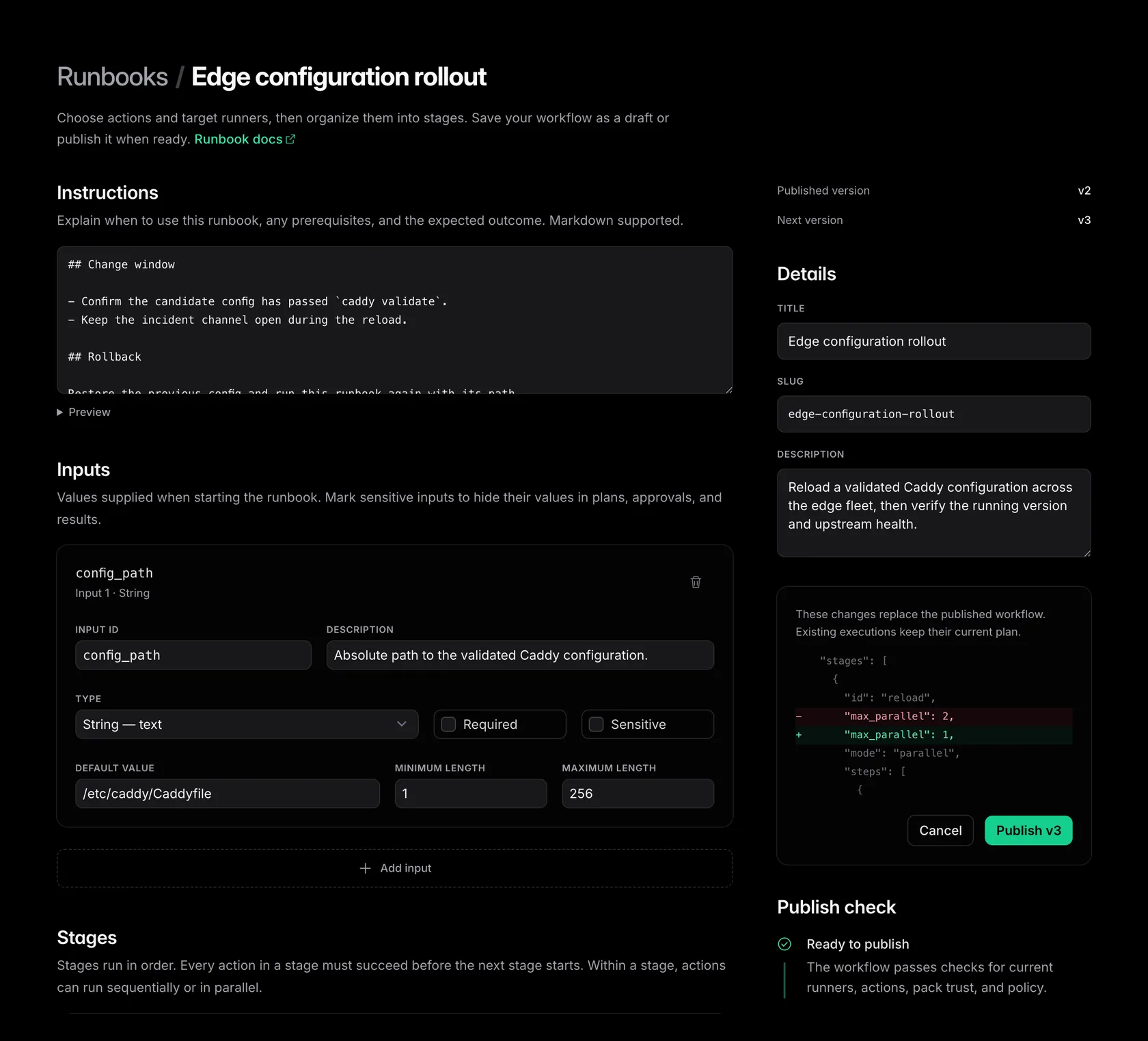
Open Runbooks and choose New runbook. Start with a short title, a stable slug, and the operator context: prerequisites, stop conditions, ownership, the expected outcome, and rollback instructions. Context supports headings, paragraphs, lists, and fenced code. Links, images, and raw HTML stay inert.
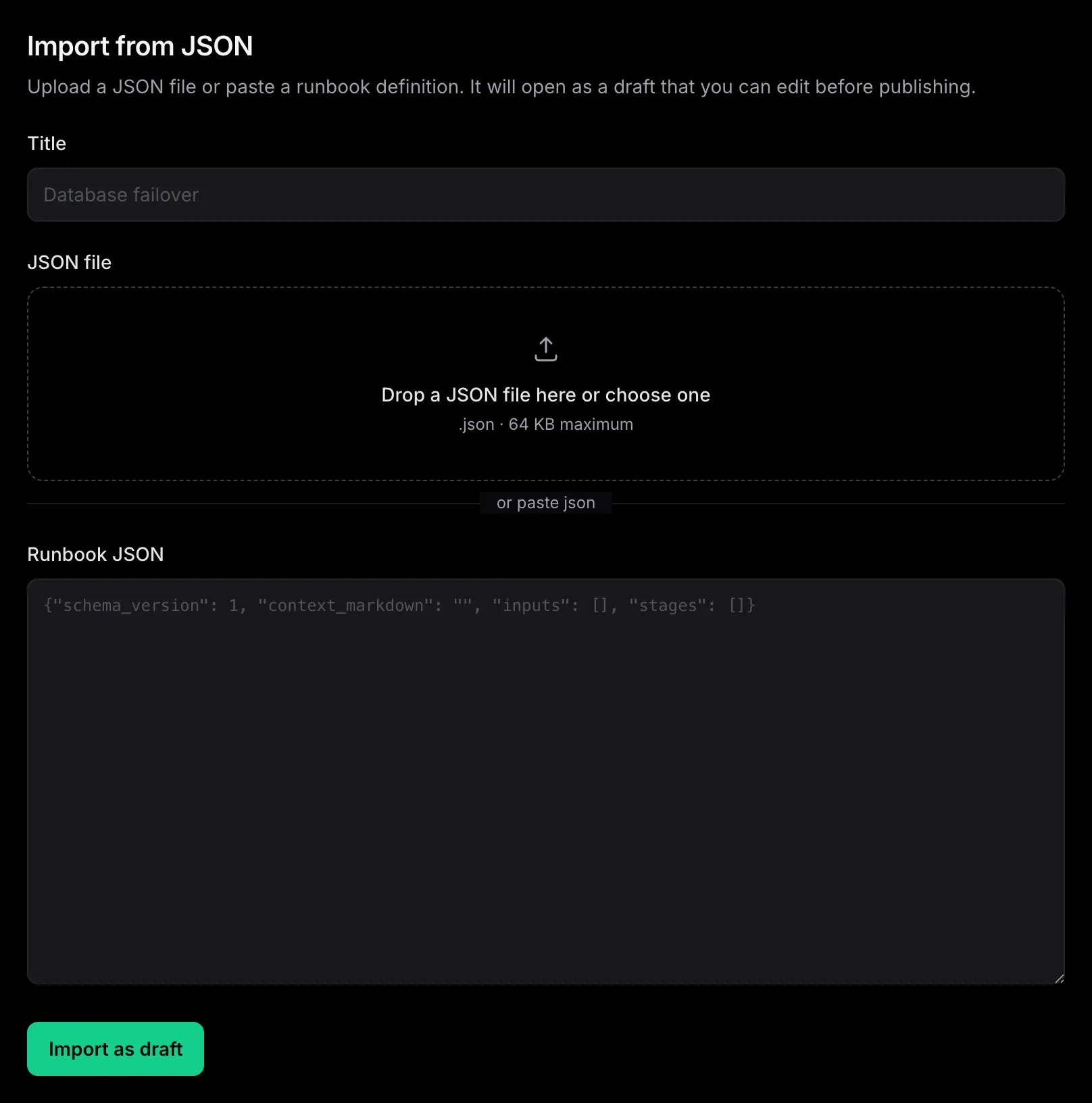
If another tool or an LLM already produced Definition v1 JSON, choose Import runbook.
Drop or select a
.json
file, or paste the document. An import always becomes an editable draft. It never publishes
or runs automatically.
2. Define the workflow#
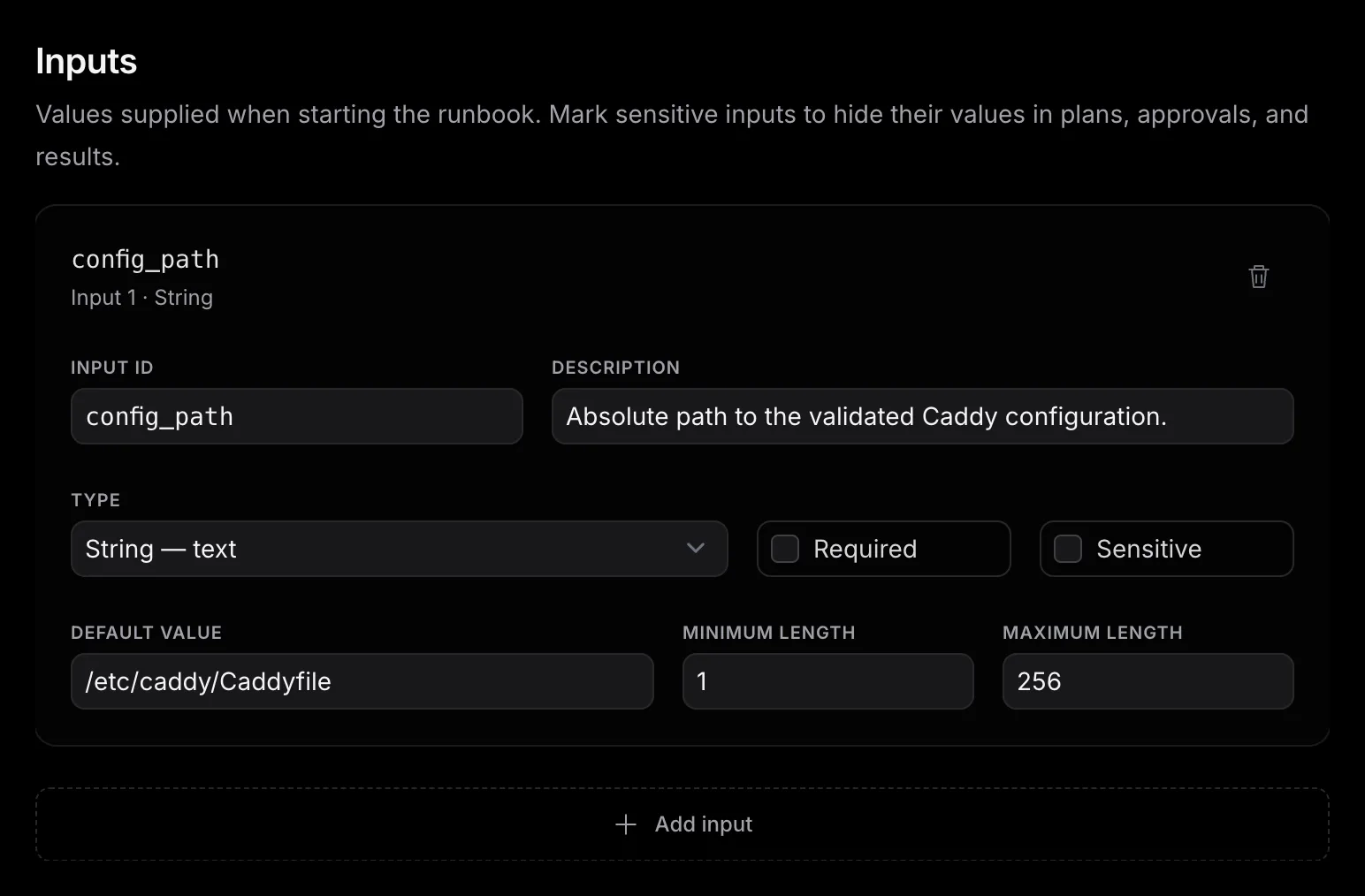
Run-time inputs#
Declare only the values that change between executions. An input can be a string, integer,
number, boolean, or enum. Make it required, constrain its range or length, or give it a
same-type default. An integer is a whole number, and a number can contain a decimal.
Sensitive inputs have no stored default and show as
[REDACTED]
in plans, approvals, and results.
Stages and steps#
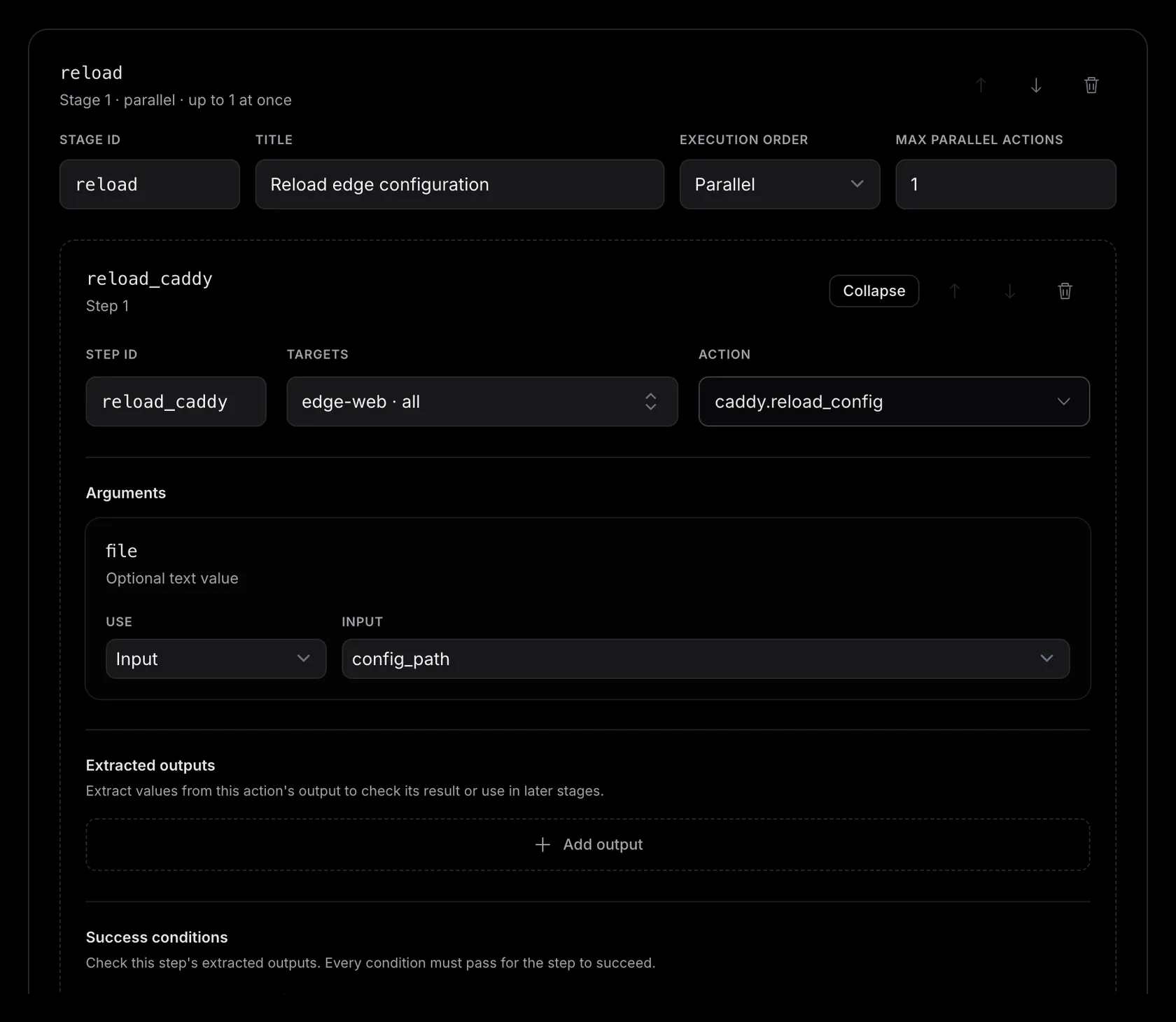
A runbook executes stages from top to bottom. A stage groups work behind one barrier. A step declares one action, its runner or group targets, argument bindings, retained outputs, success conditions, and an optional wait policy.
- — Sequential finishes one step across all selected runners before the next step starts.
-
—
Parallel
makes all stage items eligible together. Maximum concurrency limits the number of
active attempts. Use
1for one-host-at-a-time maintenance. - — Every stage is a barrier. The next stage starts only after every item in the current stage succeeds.
Select targets before choosing the action. The action menu contains only work currently available across the complete selection. The editor follows the action to its pack. You do not pin a pack version in the definition.
Target selection#
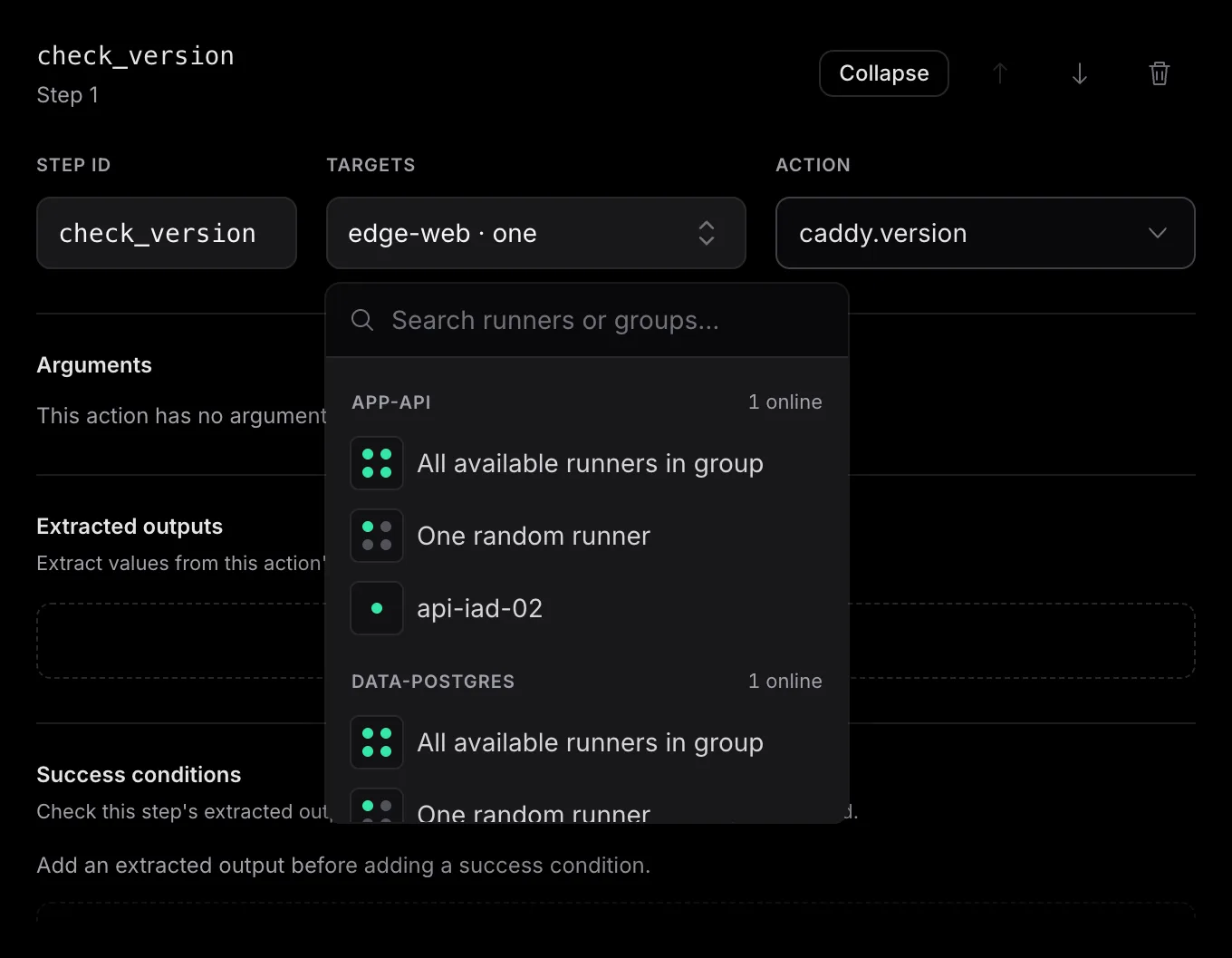
A step can run on one named runner, every online runner in a group, or one online runner from a group. Use a runner name for host-specific work, the complete group for fleet changes and checks, and one group member for representative diagnostics or a canary.
- — Runner name runs the step on that specific runner.
- — All available runners in group runs the step on every online runner in the group.
- — One random runner picks one online runner from the group.
The one-runner pick happens once, during preflight, after emisar checks the action, trusted pack, and contract on every online group member. The start page and the execution both use that same runner — if it disconnects before dispatch, the execution stops, and the work does not move to another member.
{"selection":"all","refs":["runner:nomad-hvn02~0123456789abcdef0123456789abcdef"]}
{"selection":"all","refs":["group:va1-nomad"]}
{"selection":"random_one","refs":["group:va1-nomad"]}
Action arguments#
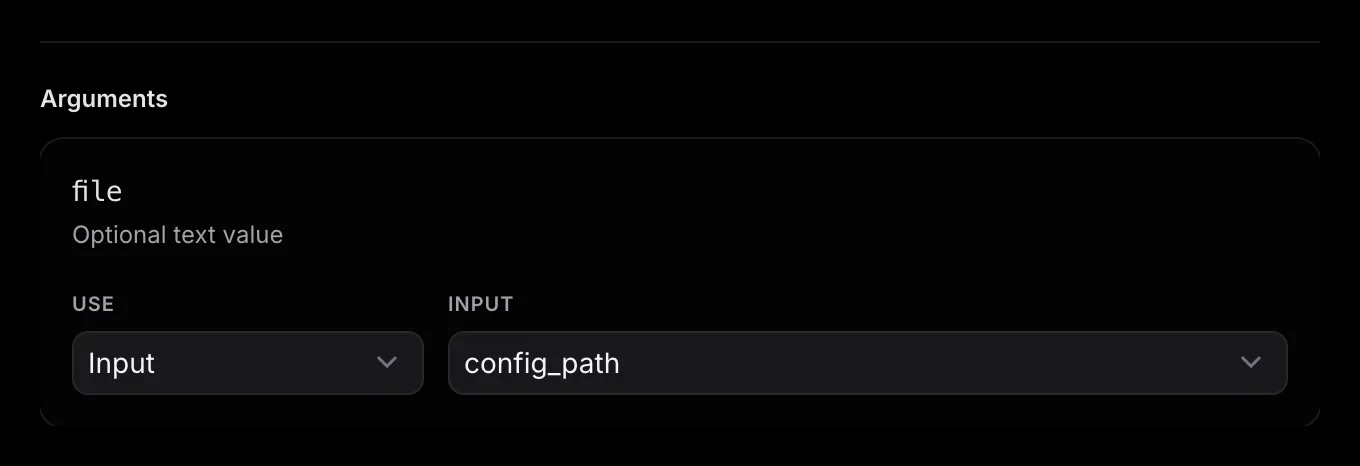
Each action argument receives one complete JSON value. Omit an optional argument, enter a literal, bind a declared run-time input, or use a named output from an earlier stage. There is no string interpolation. The editor checks the bound value against the trusted action schema before publication and again when it resolves a run.
Extracted outputs#
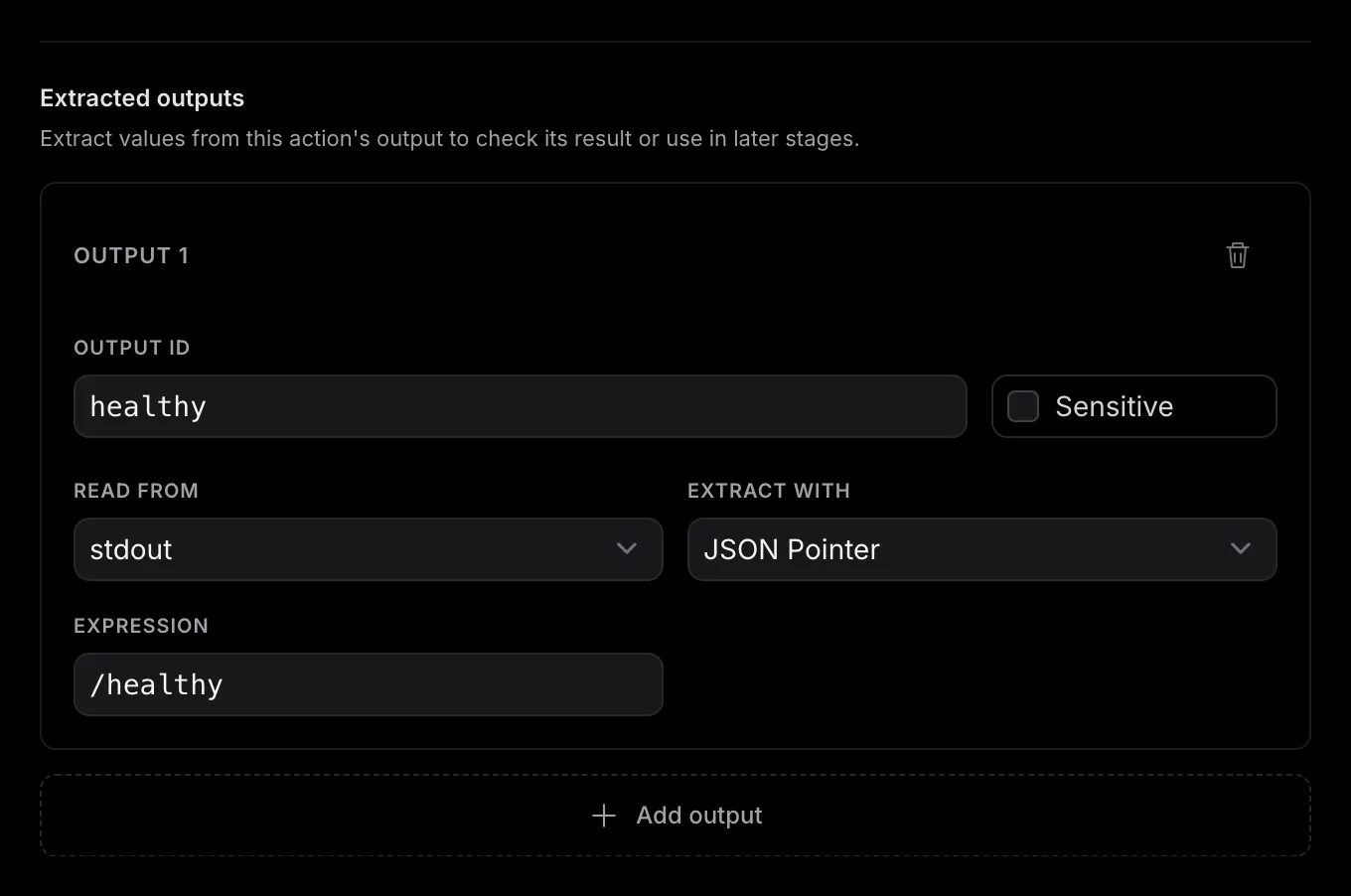
Retain only the values that later work or a success condition needs. Choose stdout or stderr, then extract with JSON Pointer, contains, literal grep, or a bounded regular expression. Give each value a stable output ID. Mark an output sensitive to mask it in results and evidence. Conditions and compatible sensitive arguments in later stages still use the real value.
JSON Pointer reads a field from a complete JSON document, such as /healthy. The selected stream must contain valid
JSON; surrounding log lines are not ignored. Invalid JSON, a missing field, or incomplete
text output causes extraction to fail.
For an action with an output schema, the editor uses its schema-validated stdout result
when you configure a stdout JSON Pointer. The runner validates redacted stdout against
that schema, and emisar validates the result again before recording success. This result
is called
structured_output
in the JSON definition; it comes from stdout, never stderr. Text extractors read the
selected stream directly. Existing bindings are preserved when you reopen a runbook.
When authoring JSON through an agent, inspect
action.output_schema
in the
get_action
response. For a new stdout JSON Pointer binding, use
structured_output
when that schema is present; otherwise use stdout.
Structured output supports JSON Pointer only. JSON Pointer can also read
stderr
JSON; text extractors always use
stdout
or stderr. Keep existing source values during
unrelated edits.
Success conditions#
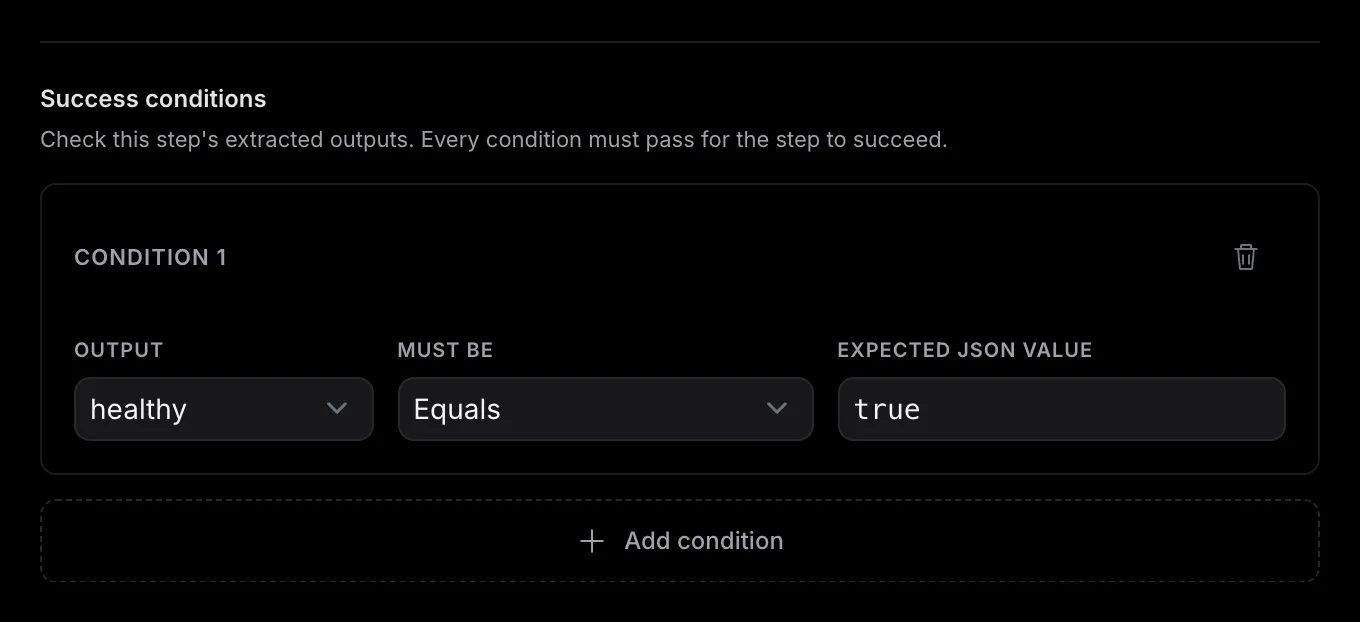
An action that exits successfully counts as a successful step unless you add conditions. Conditions read named extracted outputs. Every condition must pass. Compare with equality, ordering, containment, membership, or a bounded regular expression. Add the output first. A condition cannot refer to an undefined value.
Wait policy#
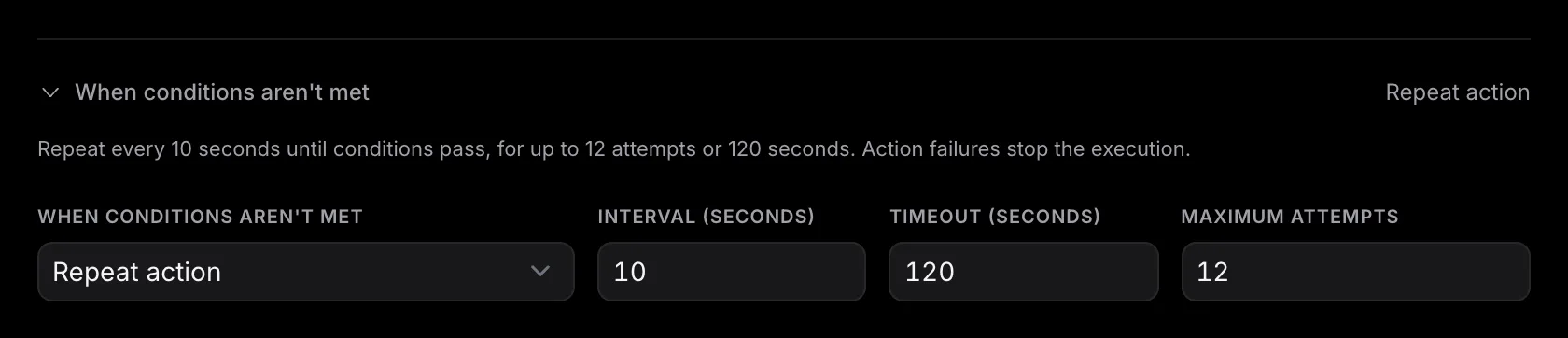
When a successful observation does not yet meet its conditions, a wait can run the same observation again after a fixed interval. Bound it with both a timeout and a maximum number of observations. A wait never retries an action failure, denial, refusal, extraction error, timeout, or cancellation. Those events halt the execution.
check_health.status. Stage and step IDs also remain stable in the frozen plan,
result, and audit trail. Titles are the human-readable text you can revise.
3. Publish a resolvable release#
Save whenever you need to keep incomplete work. Use Test draft to try valid unpublished changes. Publishing has a higher bar: the strict definition must be valid, every target must resolve in your scope, each selected runner must expose one compatible action contract, and the current trusted pack and policy plan must resolve. The editor lists every issue beside Publish check and disables Publish until the check passes.
Publish shows exactly what changes from the live definition, then mints the next release: slug@1, slug@2, and so on.
The Run action uses the published release; later edits stay separate until you publish again.
Test draft uses those unpublished changes instead. Every execution keeps the exact definition
and plan it started with. New executions check the current runners, actions, packs, and policy again.
4. Review and start the run#
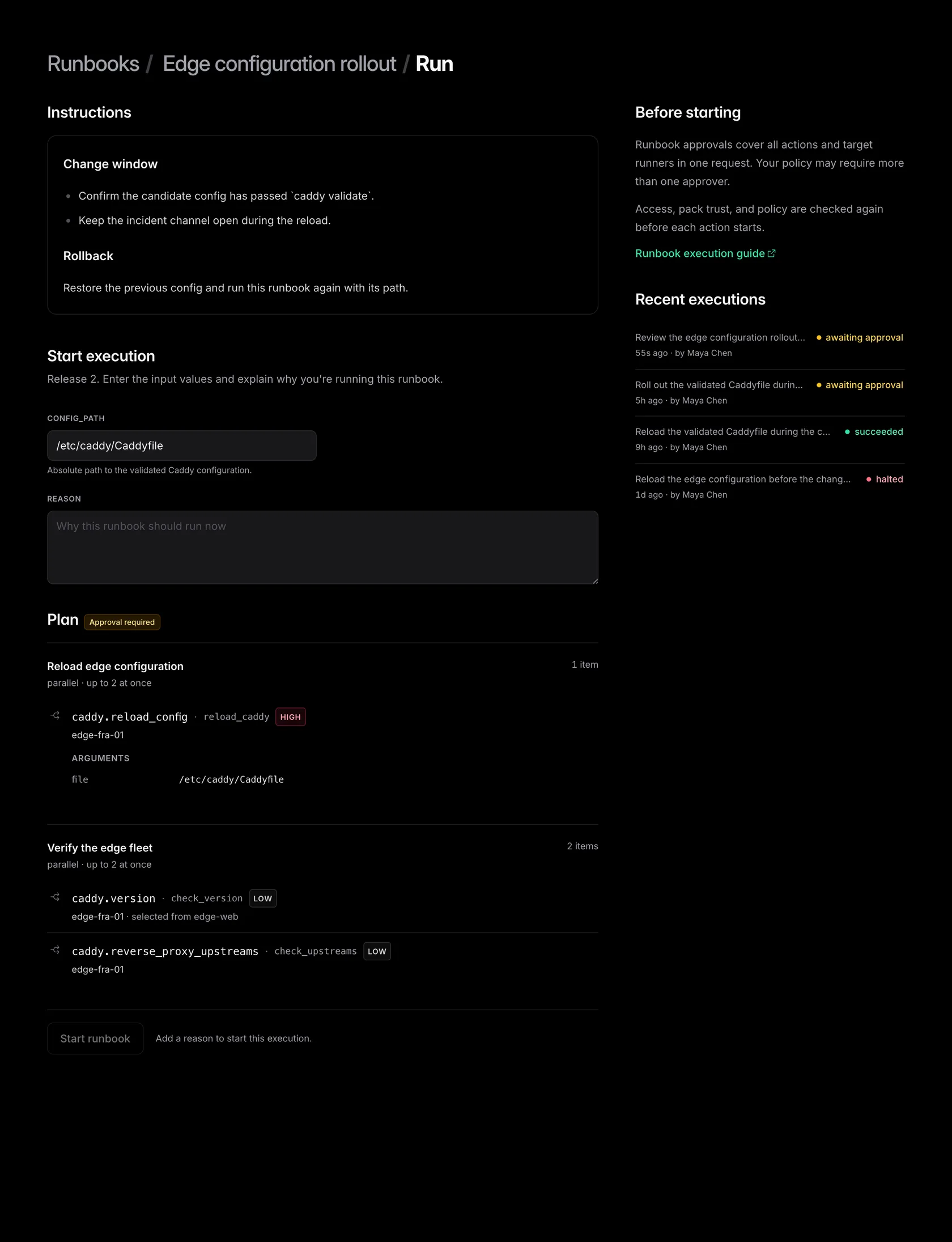
Open Runbooks and choose Run on a runbook with a live release. Supply its run-time inputs and a reason for running it now. Before Start runbook becomes available, emisar resolves the exact runner for every item, plus the current trusted pack, content hash, action arguments, policy decisions, and stage concurrency.
Review the displayed release and plan before you start. Start checks the current runners, action contracts, and policy again. If the plan changed, emisar shows the updated plan for another review without starting an execution. Publishing a newer release does not replace the release already open in your Run page. When a step picks one runner from a group, the plan shows which runner it picked and which group that runner came from. After the run starts, the plan does not change: emisar does not add or replace a target, it uses your arguments exactly as you entered them, and every step stays in its stage.
5. Approve the execution#
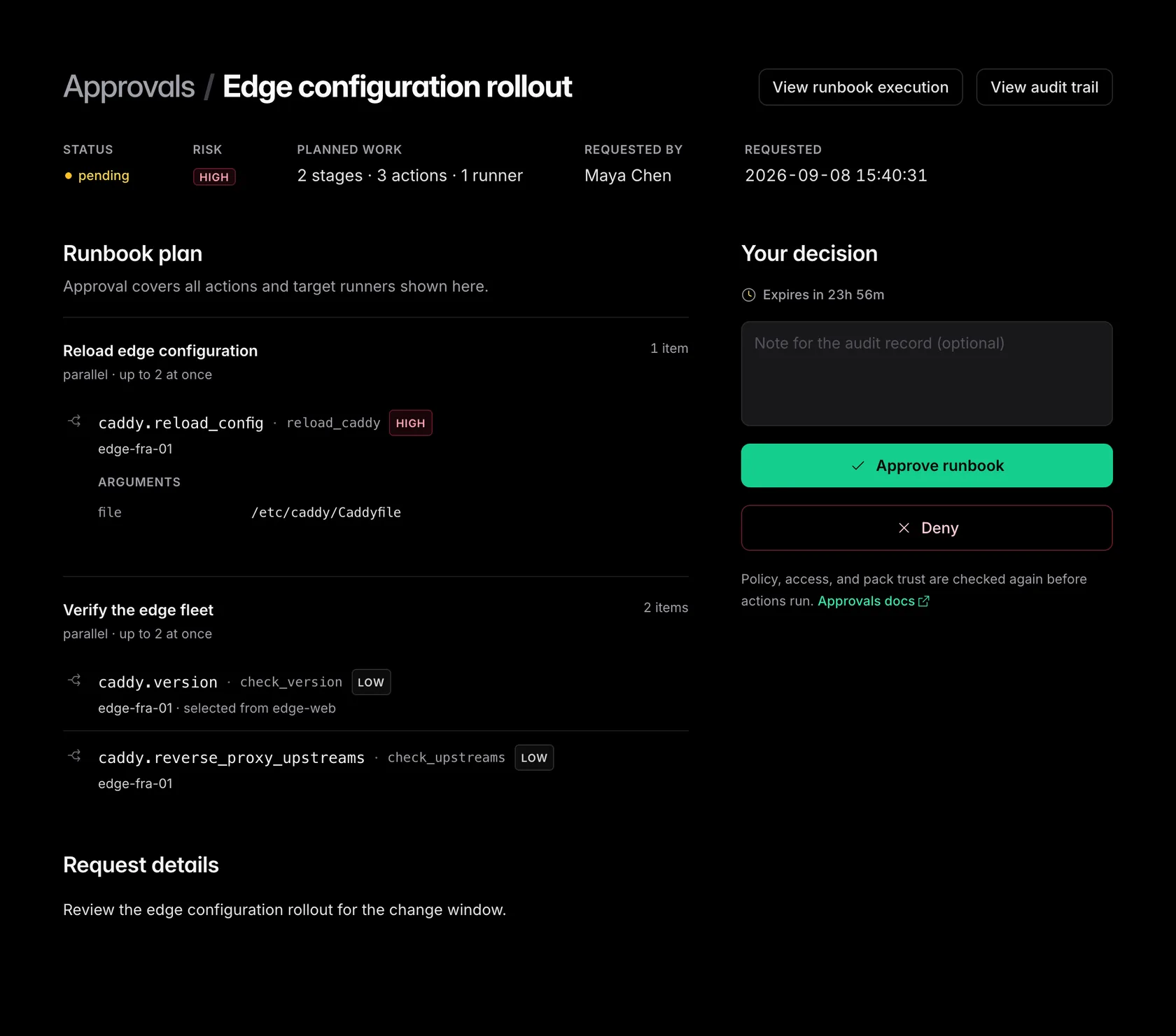
Runbooks use the same account policy as direct actions. If any item requires approval, emisar opens one approval request for the complete frozen execution. Policy may require more than one approver. The approver reviews every stage, action, runner, visible argument, and risk in one place. Approval does not create a second approval for each action.
No action run is created before approval. The decision applies only to this execution, and the approver's runner scope must cover the complete plan. Current access, policy, pack trust, action compatibility, and runner state are checked again before dispatch.
6. Read the result#
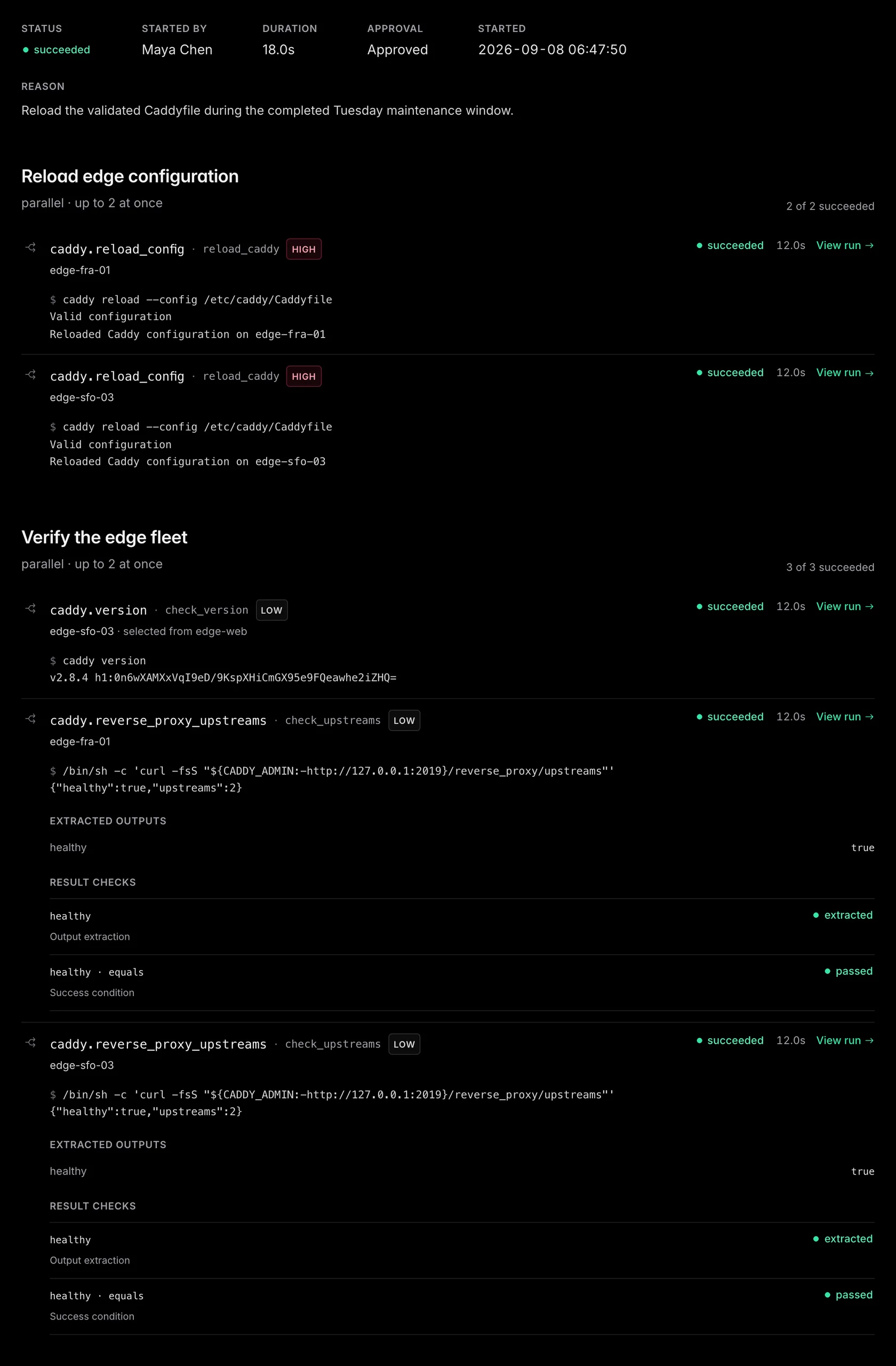
The execution page follows the same stage order as the plan. Each item shows the action, risk, runner, step ID, outcome, duration, and its bounded command and output. Choose View run for the complete action run when you need event-level detail. Sensitive values remain redacted.
When a step extracts outputs or defines success conditions, the result also keeps the extracted values, integrity digest, condition evidence, observation attempts, and wait state. This is the evidence to use when deciding whether to continue outside the runbook or start a rollback.
Definition v1 reference#
JSON is the only interchange format. The structured editor, import flow, persistence layer,
and MCP use the same strict
schema_version: 1
object. Unknown fields are rejected. This is a smaller version of the edge rollout used
throughout this guide:
{
  "schema_version": 1,
  "context_markdown": "## Before you run\n\nValidate the candidate Caddyfile.",
  "inputs": [
    {
      "id": "config_path",
      "description": "Absolute path to the validated Caddy configuration.",
      "type": "string",
      "required": false,
      "sensitive": false,
      "default": "/etc/caddy/Caddyfile",
      "min_length": 1,
      "max_length": 256
    }
  ],
  "stages": [
    {
      "id": "reload",
      "title": "Reload edge configuration",
      "mode": "parallel",
      "max_parallel": 2,
      "steps": [
        {
          "id": "reload_caddy",
          "pack": {"id": "caddy"},
          "action": "caddy.reload_config",
          "targets": {"selection": "all", "refs": ["group:edge-web"]},
          "args": {
            "file": {"source": "input", "ref": "config_path"}
          },
          "outputs": [],
          "success": [],
          "wait": null
        }
      ]
    },
    {
      "id": "verify",
      "title": "Verify the edge fleet",
      "mode": "parallel",
      "max_parallel": 2,
      "steps": [
        {
          "id": "check_upstreams",
          "pack": {"id": "caddy"},
          "action": "caddy.reverse_proxy_upstreams",
          "targets": {"selection": "all", "refs": ["group:edge-web"]},
          "args": {},
          "outputs": [
            {
              "id": "healthy",
              "source": "structured_output",
              "sensitive": false,
              "extract": {
                "type": "json_pointer",
                "expression": "/healthy"
              }
            }
          ],
          "success": [
            {
              "output": "healthy",
              "operator": "equals",
              "value": true
            }
          ],
          "wait": {
            "interval_seconds": 10,
            "timeout_seconds": 120,
            "max_attempts": 12
          }
        }
      ]
    }
  ]
}
Failure and safety#
A denial, refusal, timeout, cancellation, action failure, extraction failure, unmet terminal condition, lost authorization, or unusable frozen pack halts the execution. Peers already running can settle and report their real outcomes. No new item or later stage starts.
Approval never overrides later drift. Before every physical attempt, emisar rechecks runner access, current membership, policy, pack trust, the action contract, and runner state. Cancelling an execution also cancels pending stages, waits, and active attempts without erasing their history.
run_action
dispatches. A runbook that targets a signature-enforcing runner fails closed with signed_runbook_unsupported; use individually signed actions for that runner.
LLMs and MCP#
An agent reads runbooks with
list_runbooks
and get_runbook. By default
it sees the live release; asking with
status: "draft"
shows the unpublished change instead.
create_runbook_draft
starts a new runbook.
update_runbook_draft
replaces the one unpublished change, and it must send the
definition_sha256
it read — if someone else edited the draft in the meantime, the update is refused
instead of overwriting their work. Publishing stays a human step in the console.
execute_runbook
runs the live release. To test draft content, the agent must ask for it clearly —
allow_draft: true
plus the draft's hash — and the test goes through the same policy and approvals as any
run without publishing anything. Asking for an older release answers
not_live
instead of quietly running the current one. While work or an approval remains, the
response shows what is still blocking and returns an exact
wait_for_run
continuation.
For client setup and the complete tool contract, continue to Connect a cloud LLM.
Limits#
| What | Limit |
|---|---|
| Definition | 64 KiB |
| Run-time inputs | Up to 32 |
| Stages | Up to 16 |
| Target refs per step | Up to 16 |
| Resolved execution | 256 items — one per runner per step |
| Parallel attempts in a stage | 1 to 16 at once — 5 by default |
| Retained outputs per step | Up to 16 |
| Success conditions per step | Up to 16 |
| Wait | Polls every 5 seconds to 1 hour, 2 to 100 attempts |
| Frozen execution plan | 1 MiB |
| Execution duration | Ends within 24 hours, waits included |
| Title | 80 characters, 320 bytes |
| Description | 4,096 characters, 8 KiB |
These are the only limits you need to track. An agent reads a runbook through one MCP response. That response budget comes from the limits above. Anything you can save and publish is something an agent can read and run. If a runbook exceeds the budget, the agent reports that it is too large and directs the user to the console — it never reports that the runbook does not exist.
See the limits reference for the wider API, output, and retention caps.