
Docs navigation
Get started
AI agents
Connect
Operate
Day to day
When it breaks
Govern access
Team & account
Access
Identity concepts
Provider guides
Account
Manage agents & keys
Manage the agents connected to your account, and the keys behind them.
To connect a new agent, see Claude.ai, ChatGPT, or CLI agent. For bridge versions and updates, see Upgrade the MCP bridge.
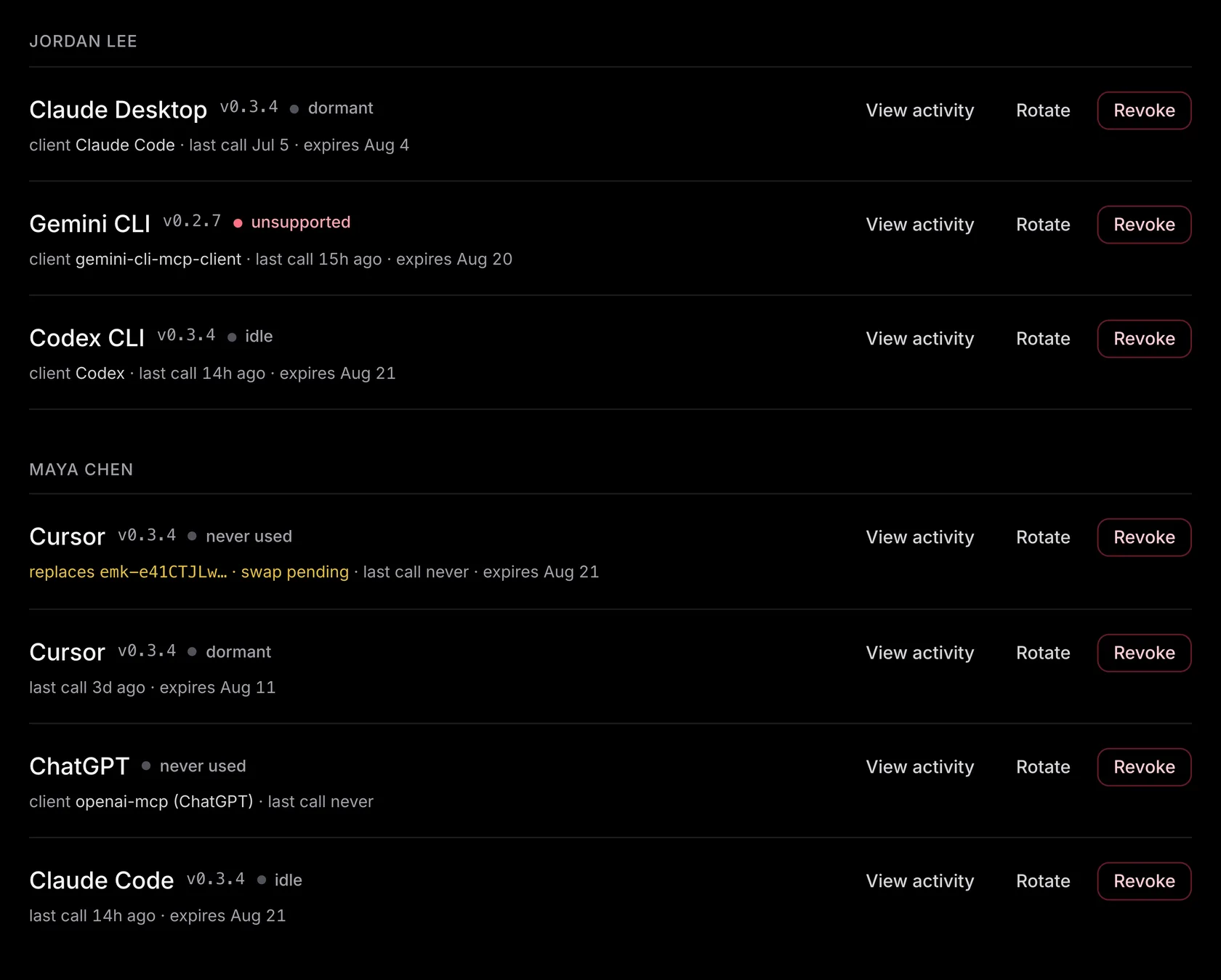
Your connected agents#
Every agent that has connected appears on AI agents, grouped by the member who owns it. One row is one connection: the client it runs in, the bridge version it last reported, when it last called, and when its key expires. The list shows live connections by default.
- — The status is about the connection. A row reads dormant, idle, or never used based on its own last call. It reads unsupported when the bridge it reported is below the version emisar supports. A rotation in progress shows as Rotation requested, then waits for the successor's first call to retire the old key.
- — Each row has its own actions. View activity opens Runs filtered to that agent; View audit trail opens its audit events. Rotate and Revoke act on the key behind it and are covered below. Copy ID copies the key's identifier. The secret is never shown again, so the identifier is the safe value to quote in a support request.
- — To remove an agent, revoke its key. There is no separate disconnect: the key is the connection, so revoking it ends the agent's access on its very next call.
What an agent key is#
An agent key is the credential an AI agent presents to reach emisar's tool API. It is sent as
Authorization: Bearer emk-…
on every call to the MCP endpoint. Keys start with
emk-
followed by a short public identifier.
- — Shown once. The full secret appears exactly once, at creation (and again at rotation). Copy it into the client's config then. emisar keeps only the hash, so a lost key can be replaced but never recovered.
- — Identity, not authority. A key holds only an identity, an optional expiry, and audit attribution.
- — One key per connection. Each connected client gets its own key, so you can see and revoke agents one at a time. Cloud clients that connect over OAuth work the same way.
A key has no scope of its own#
An agent key carries no scope of its own. There is no per-key runner list or permission dial to set, and none to forget. A key acts as a member: the person it belongs to, or a service account. Two things set on that member decide what the connected agent can do:
- — Runner access. The key can reach exactly the runners available to the member it acts as. A member is scoped to runner groups on the Team page. The key inherits that scope, and emisar looks it up from that member on every call, not once at mint time.
-
—
What it can run there.
Your account's policies decide this, along with the approvals they require. A human
dispatch passes the same checks. A key authenticates as a fixed
api_clientrole. It can discover the catalog, dispatch actions, and read run state. It cannot approve its own requests or edit policy. The member's role does not carry over to the key. Owner and operator keys have the same capability.
Scoping a member also scopes the agents that act as them. To limit an agent, use an Admin or Operator membership and narrow that member's access on the Team page. Owners always have access to all runners and packs; their keys still use the fixed API-client permissions and pass policy, approval, and trust checks. Promoting a scoped member to Owner expands their connected agents' access without replacing credentials or reconnecting. Remove that member's access to stop every key that acts as them from reaching any runner. A key with no member behind it is never usable.
Minting a key#
Keys are minted from AI agents in the console, the same place you connect and revoke agents. Pick the client you are connecting to see its setup instructions. Open Set up [client] manually to create a key and see the command or configuration for that client. Cloud clients like Claude.ai and ChatGPT do not use a pasted key. They connect over OAuth. emisar mints their backing key only after you approve the connection.
- — Minted on demand, per client. emisar creates a key when you open manual setup or approve an installer. Choosing co:op creates the key for its displayed configuration. Other local client choices do not create a key until you take the next setup step.
- — Operator and above. Connecting an agent (minting a key) needs an operator, admin, or owner role. A viewer can see the agents list but cannot mint. Operators can rotate or revoke their own keys. Admins and owners can manage any key in the account.
- — Keys for a service account. An owner or admin creates a key that acts as a service account from Settings → Service accounts: choose Actions → Create API key in its row. The key uses the service account's access, its calls are attributed to the service account, and it keeps working when the person who made it leaves.
Rotating a key#
Choose Rotate on an agent's row to replace its key. If the agent supports automatic rotation, it saves the new key on its next call, so there's nothing to copy. The row shows Rotation requested while it waits. Otherwise, emisar shows a new key for you to copy into the agent's settings.
The current key keeps working until the new key is used or the current key expires. The first authenticated request with the new key retires the old one automatically. Each row shows its expiry; hover or focus the time to see the exact date. OAuth connections show OAuth-managed expiry because their tokens have a separate lifecycle.
- — Manual setup when needed. If automatic rotation stays pending, choose Rotate manually on the same row. This cancels the pending request and shows a replacement key once. Copy it into the agent's settings. If you lose it, rotate the replacement key's row.
- — Manually rotating someone else's key. Manual rotation shows the replacement key to you, so you can do it for a teammate's or a service account's key only when your own runner and pack access covers theirs. emisar records you as the person the replacement was issued to. Automatic rotation hands the new key to the agent instead. Anyone who can manage the key can still revoke it.
- — You can still revoke the old key. Revocation also ends access for that key's replacements. Use it to stop access after a leak. A normal rotation finishes on its own when the new key is first used.
-
—
An OAuth-backed key does not rotate.
OAuth consent creates a non-expiring key for a Claude.ai or ChatGPT connection, and
OAuth manages its life through the refresh token. The client never receives a new
emk-secret. Reconnect the client to replace that key, or revoke it to end access. - — MCP bridge keys are short-lived and rotate themselves. During a key's last seven days, the bridge prepares and proposes a successor, and promotes it only after emisar confirms the exact new key. Long-running local agents keep working through the change. This needs the bridge's credential directory to be writable and persistent. OAuth tokens, arbitrary Bearer tokens, and audit-export tokens do not take part in local rotation. By default, automatic renewal is limited to 90 days from the connection's original key; after that, Rotate uses manual setup. A pending request does not extend the current key's expiry.
Revoking a key#
Revoke takes effect as soon as you confirm: the key stops working and the connected client is refused on its very next call. Use it when a key leaks, an agent misbehaves, or a connection is finished. For an active key, confirmation asks you to type the agent's name. An expired key needs a simple confirmation instead.
Revoking cascades: every later key in that key's rotation chain is revoked with it. Any OAuth access or refresh token backed by it stops exchanging and refreshing. Because of this cascade, use revoke, not rotate, to contain a leak.
For a lost or stolen device, revoke everything at once: Revoke all on the member's group revokes every usable key that member owns. Each connected client is refused on its next call, with the same cascade per key. Revoke all asks you to type the member's name. A member can do this for their own keys; anyone else's need an admin.
A key that suddenly returns
401
has expired, been revoked, or been retired by a successor.
Troubleshooting
shows how to tell which.